
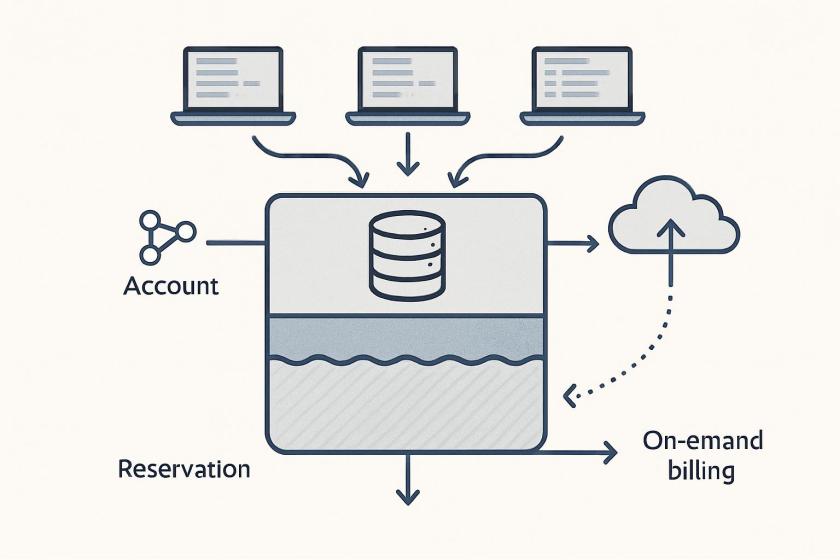
Amazon Redshift Serverless Reservations are less about a simple discount and more about turning variable analytics spend into a capacity-planning exercise. The practical architectural question is where to place the commitment boundary: at a single workgroup, across multiple workgroups, or across linked accounts under one payer. Because reservations are managed centrally and apply only within a Region, teams need to align procurement with the organizational and regional shape of their data platform.
The main operational dependency is usage visibility. Reservation sizing depends on how consistently RPUs are consumed over time, so cost optimization starts with telemetry, not purchasing. The Redshift Serverless dashboard and SYS_SERVERLESS_USAGE can reveal whether workloads have a stable baseline or bursty spikes. That distinction matters because excess demand still falls back to on-demand billing, which can erode the expected savings if the committed level is set too aggressively.
For platform teams, the trade-off is predictability versus flexibility. A reservation improves budget stability and can simplify chargeback or shared-services governance, but it also creates an immutable commitment that cannot be reduced later. That makes conservative sizing important, especially in environments where workload growth, seasonal analytics cycles, or new workgroups may change the aggregate profile. The safest approach is to anchor reservations to a defensible base load and treat future additions as incremental capacity.
This also has DevOps and FinOps implications. Reservation recommendations are only as useful as the historical window behind them, so the quality of the estimate depends on selecting representative production data. Teams operating multiple workgroups should evaluate whether consumption complements each other across the payer account, since pooled usage can improve effective discount realization even when individual services appear undersized. In practice, the benefit comes from matching reservation design to the operating model of the warehouse, not just to a single workload snapshot.
How Amazon Redshift Serverless Reservations work
Amazon Redshift measures data warehouse capacity in Redshift Processing Units (RPUs). You pay for the workloads you run in RPU-hours on a per-second basis (with a 60-second minimum charge). 1 RPU provides 16 GB of memory. You can commit to a specific number of Redshift Processing Units (RPUs) for a one-year term. Two payment options are available: a no-upfront option with a 20% discount off on-demand rates, or an all-upfront option with a 24% discount. The reserved amount of RPUs is billed 24 hours a day, seven days a week Amazon Redshift Serverless Reservations are managed at the AWS payer account level and can be shared across multiple AWS accounts. Any usage beyond your committed RPU level is charged at standard on-demand rates. You can purchase Serverless Reservations through either the Amazon Redshift console or the Amazon Redshift Serverless Reservations API using the create-reservation command.Key benefits of Amazon Redshift Serverless Reservations
The following are some of the key benefits of subscribing to Redshift Serverless Reservations.- Cost savings through commitment: Redshift Serverless Reservations help you reduce your overall Redshift Serverless spend compared to on-demand (non-reserved) usage.
- Centralized management: Supports reservation administration at the AWS payer account level for simplified governance and visibility across your organization.
- Per-second metering with hourly billing: Offers per-second metering with hourly billing, so that you only pay for what you use. This cost-effective pricing model eliminates wasted resources and unnecessary charges, lowering your Amazon Redshift Serverless spend.
- Predictable costs: The 24 hours a day, 7 days a week billing model offers stable monthly costs that simplify forecasting and budgeting.
- Sharing capabilities between multiple AWS accounts: Enhances collaboration across different teams and departments, enabling improved resource utilization throughout your organization.
Determining optimal RPU reservation
You can determine your RPU reservation level through your serverless usage history and the AWS Billing and Cost Management recommendations.Serverless usage history
You can use the Redshift Serverless Dashboard, which provides a detailed view of your workgroup and namespace activities. The dashboard helps you to analyze trends and patterns in your data warehouse usage. You can easily monitor your RPU capacity usage and total compute usage, helping you make informed decisions about resource allocation. For more granular analysis, you have the option to query the SYS_SERVERLESS_USAGE system table, which provides detailed historical usage data. To optimize costs while ensuring performance, you can reserve the minimum consistent RPUs used per hour by analyzing the usage patterns across all your workgroups.AWS Billing and Cost Management recommendations
You can use AWS Billing and Cost Management to help you estimate your capacity needs:- Navigate to your Billing and Cost Management dashboard.
- On the left navigation pane, expand Reservations.
- Choose Recommendations.
- Select Redshift in the Service drop down menu.
- Choose required Term, Payment option, and Based on the past to select the history to determine reservation recommendations.
- You will find the recommendations in the Recommendations section. The following is an example screen:
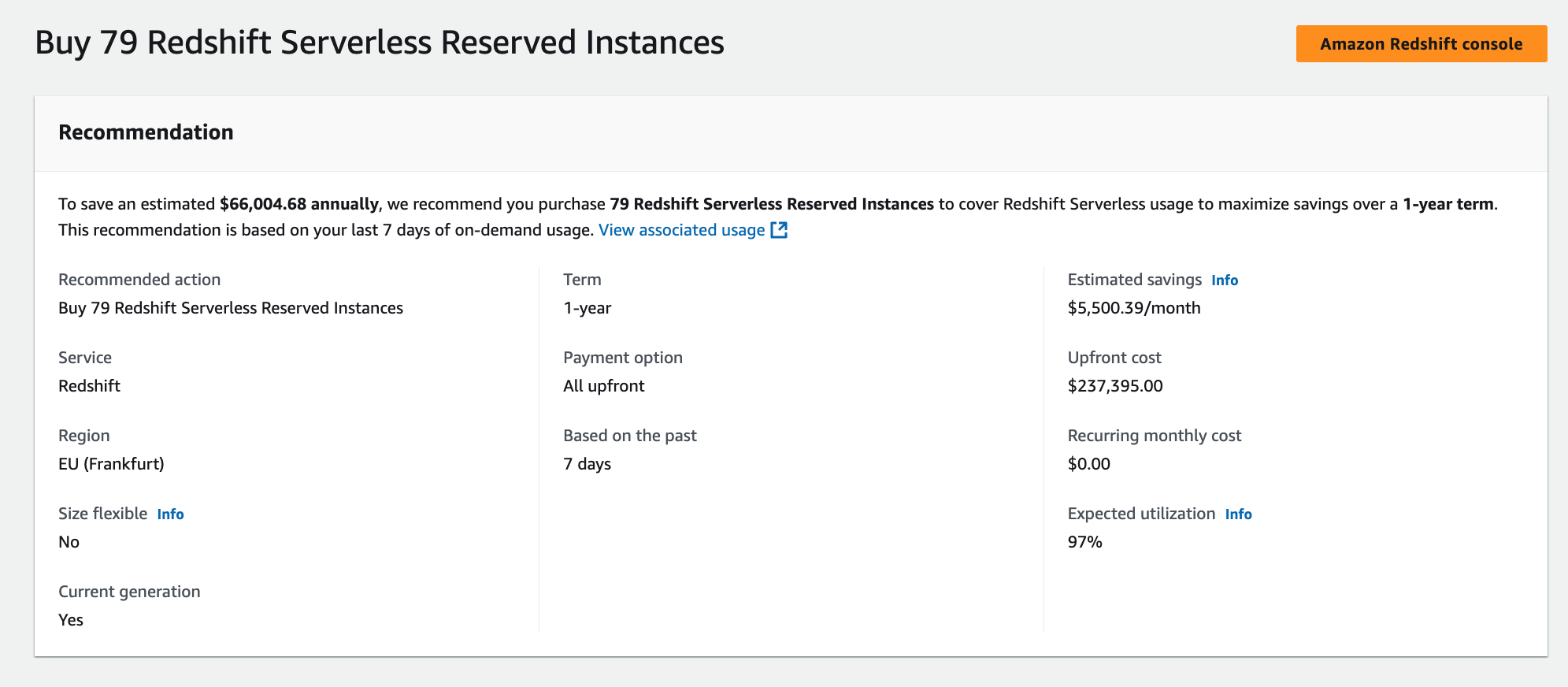
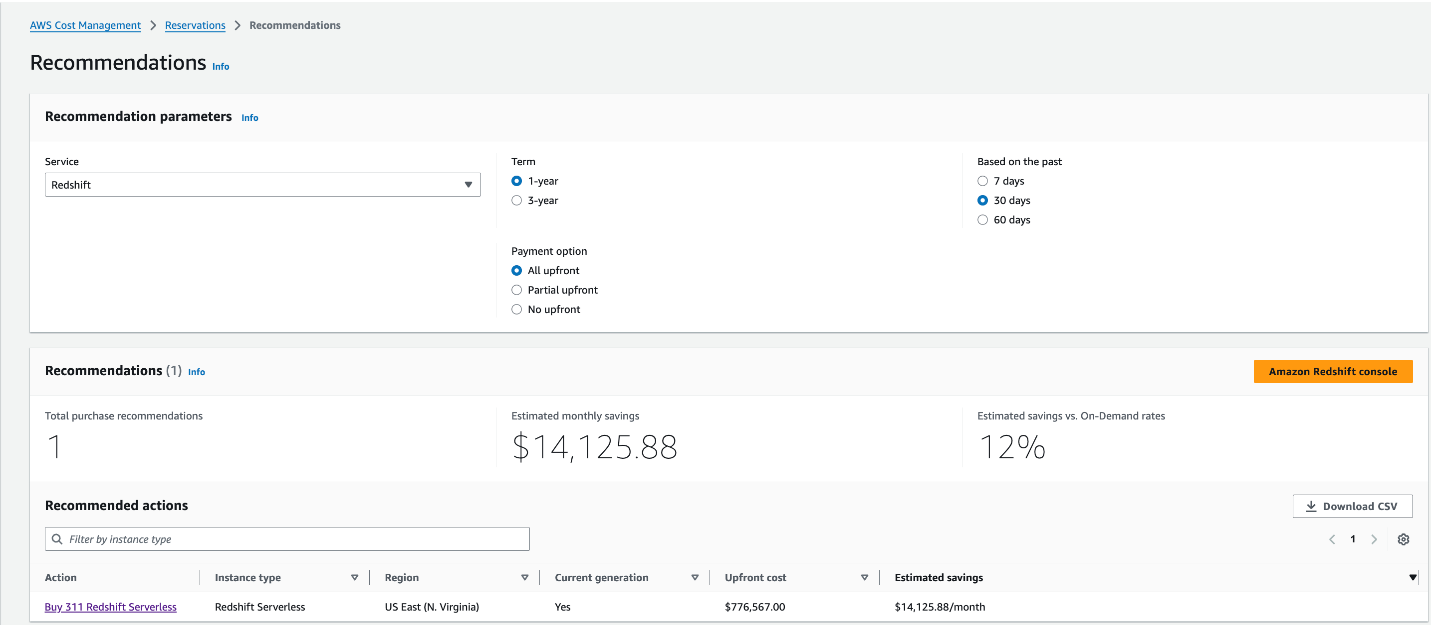 The following example shows a Redshift Serverless purchase recommendation from AWS Cost Management. The interface displays a specific recommendation to buy Reserved Instances with key details including the term length, AWS Region, payment option, and expected utilization rate. The recommendation includes upfront and recurring cost information, with a direct link to the Amazon Redshift console for implementation.
 If reservations are not recommended based on your usage, then you will see “Based on your selections, no purchase recommendations are available for you at this time. Adjust your selections to view recommendation” message under the Recommended actions section.
Cost Explorer generates your reservation recommendations by identifying your On-demand usage during a specific period and identifying the best number of reservations to purchase to maximize your estimated savings.
Disclaimer: The approaches described above provide an estimate of your optimal RPU reservation level. Actual results may vary depending on workload patterns, peak usage, and utilization variability. Your RPU commitment may not always yield the maximum available discount percentage, as savings depend on how closely your Redshift Serverless Reserved RPUs aligns with real usage over time. This recommendation does not guarantee the cost for your actual use of AWS services.
For more details visit Accessing reservation recommendations.
Real-world scenarios
Let’s examine two different scenarios to understand how reservations can help you optimize costs, we’ll walk through the scenario of a single Redshift Serverless workgroup and a scenario with multiple Redshift serverless workgroups.
Scenario 1: Single Redshift Serverless workgroup
Let’s consider you have only one Redshift Serverless workgroup in your environment and the workload is spread as described in the following table.
If reservations are not recommended based on your usage, then you will see “Based on your selections, no purchase recommendations are available for you at this time. Adjust your selections to view recommendation” message under the Recommended actions section.
Cost Explorer generates your reservation recommendations by identifying your On-demand usage during a specific period and identifying the best number of reservations to purchase to maximize your estimated savings.
Disclaimer: The approaches described above provide an estimate of your optimal RPU reservation level. Actual results may vary depending on workload patterns, peak usage, and utilization variability. Your RPU commitment may not always yield the maximum available discount percentage, as savings depend on how closely your Redshift Serverless Reserved RPUs aligns with real usage over time. This recommendation does not guarantee the cost for your actual use of AWS services.
For more details visit Accessing reservation recommendations.
Real-world scenarios
Let’s examine two different scenarios to understand how reservations can help you optimize costs, we’ll walk through the scenario of a single Redshift Serverless workgroup and a scenario with multiple Redshift serverless workgroups.
Scenario 1: Single Redshift Serverless workgroup
Let’s consider you have only one Redshift Serverless workgroup in your environment and the workload is spread as described in the following table.
 In the table, hourly RPU consumption metrics for workgroup1 across different time intervals. The data shows a reservation of 64 RPUs with no upfront payment option, which provides a 20% discount. The table breaks down the compute usage into two categories: Reserved compute, consistently showing 64 RPUs across all hours, and On-demand compute, which varies based on actual consumption above the reserved capacity. The bottom row displays the Total charged RPUs, which reflects the final billing after applying the reserved instance discount. This helps visualize how the workload utilizes the reserved capacity and any additional on-demand usage throughout the specified time period.The total actual RPU consumption is 1,664 and the total charged consumption is 1,484.8. This configuration results in a 10.7% net discount.
Scenario 2: Multiple Redshift Serverless workgroups
In this scenario, you have multiple Redshift serverless workgroup in your environment and the workload is spread as described in the following table.
In the table, hourly RPU consumption metrics for workgroup1 across different time intervals. The data shows a reservation of 64 RPUs with no upfront payment option, which provides a 20% discount. The table breaks down the compute usage into two categories: Reserved compute, consistently showing 64 RPUs across all hours, and On-demand compute, which varies based on actual consumption above the reserved capacity. The bottom row displays the Total charged RPUs, which reflects the final billing after applying the reserved instance discount. This helps visualize how the workload utilizes the reserved capacity and any additional on-demand usage throughout the specified time period.The total actual RPU consumption is 1,664 and the total charged consumption is 1,484.8. This configuration results in a 10.7% net discount.
Scenario 2: Multiple Redshift Serverless workgroups
In this scenario, you have multiple Redshift serverless workgroup in your environment and the workload is spread as described in the following table.
 Similar to the previous single workgroup scenario, you can see hourly RPU consumption metrics for workgroups across different time intervals. In this scenario, you have also opted for 64 RPUs reserved with no upfront option, which applies a 20% discount to the workload. However, you can notice that the total consumption across workgroups matches the total reserved RPUs. This maximizes your total savings even though individual workgroups consumed less than the total RPUs reserved at the payer account level.
The total actual RPU consumption is 1,536 (768+512+256) across workgroups and the total charged consumption is 1,228.8. This configuration results in a 20% net discount.
You can use the following query to find the average RPUs consumed in each hour in a workgroup.
Similar to the previous single workgroup scenario, you can see hourly RPU consumption metrics for workgroups across different time intervals. In this scenario, you have also opted for 64 RPUs reserved with no upfront option, which applies a 20% discount to the workload. However, you can notice that the total consumption across workgroups matches the total reserved RPUs. This maximizes your total savings even though individual workgroups consumed less than the total RPUs reserved at the payer account level.
The total actual RPU consumption is 1,536 (768+512+256) across workgroups and the total charged consumption is 1,228.8. This configuration results in a 20% net discount.
You can use the following query to find the average RPUs consumed in each hour in a workgroup.
SELECT
date_trunc('hour',end_time) AS run_hr,
avg(compute_capacity)
FROM SYS_SERVERLESS_USAGE
GROUP BY 1
ORDER BY 1Considerations
We recommend you consider the following when using Redshift Serverless Reservations:- Start conservatively: Avoid over-purchasing Serverless Reservations RPUs. It’s best to begin with a minimum base RPU level or align your commitment to the average RPU usage across all Redshift Serverless workgroups under your AWS payer and linked accounts.
- Reservations are immutable: Once purchased, Redshift Serverless Reservations can’t be changed or deleted. However, you can add additional reservations later to increase your coverage as your workloads grow.
- Discount sharing control: The management account in an AWS Organization can disable Reserved Instance or Savings Plan discount sharing for any linked accounts, including itself. See the AWS documentation for details.
- Automatic discount application: Redshift Serverless Reservations billing model automatically applies all the reserved RPU discount to your workloads before using on-demand cost, helping you save on costs.
- Reservations are Regional: They apply only within the AWS Region where they are purchased and cannot be shared across Regions.
- Handling excess usage: If your workload exceeds the number of reserved RPUs, the additional usage is billed at the standard on-demand rate.
- Use a 30 to 60-day window for recommendations: To receive the most accurate reservation recommendations, we suggest using a 30- to 60-day usage window in the Billing and Cost Management console, under Reservations, in the Recommendations section. This approach assumes that your typical production workloads have been running during that period so that the recommendations reflect real-world usage.
Conclusion
In this post, we described how Amazon Redshift Serverless Reservations provide a way to reduce your data warehouse costs while maintaining the flexibility of Redshift serverless pricing. By carefully planning your Amazon Redshift Serverless Reservation strategy and monitoring usage patterns, you can achieve up to 24% cost savings for your Redshift Serverless analytics workloads. For detailed documentation, see Billing for serverless reservations.About the authors
Satesh Sonti
Satesh is a Principal Specialist Solutions Architect based out of Atlanta, specializing in building enterprise data platforms, data warehousing, and analytics solutions. He has over 20 years of experience in building data assets and leading complex data platform programs for banking and insurance clients across the globe.Ashish Agrawal
Ashish is a Principal Product Manager with Amazon Redshift, building cloud-based data warehouses and analytics cloud services. Ashish has over 25 years of experience in IT. Ashish has expertise in data warehouses, data lakes, and platform as a service. Ashish has been a speaker at worldwide technical conferences.Enjoyed this article? Sign up for our newsletter to receive regular insights and stay connected.