
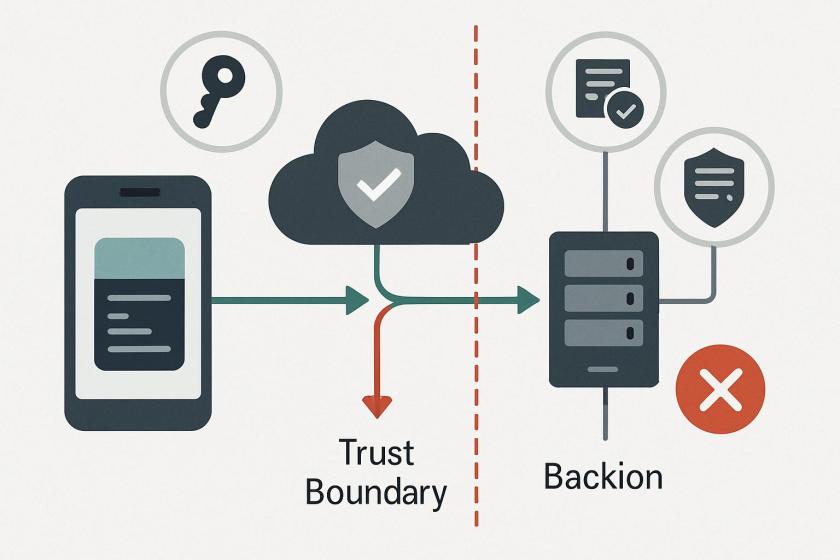
For architects, the key takeaway is that Play Integrity is a signal source, not a full control plane. It can help answer whether a request appears to come from a genuine Android app on a genuine device, but it does not automatically solve channel protection, secret exposure, or broader API abuse. That means teams still need complementary controls at the backend: request authorization, replay resistance, certificate management, telemetry, and policy enforcement that can react when integrity checks are unavailable, delayed, or bypassed.
The operational trade-off is platform fragmentation versus consistency. Android-only attestation creates a split security model for cross-platform estates, especially when iOS and Android are built from shared business logic but require different trust decisions. This complicates rollout, testing, and incident response because security policy must be aligned across runtimes, SDKs, and server-side enforcement paths. For teams using Flutter or React Native, the real cost is often not the SDK itself but the maintenance of divergent attestation logic and edge-case handling across platforms and environments.
Reliability and deployment risk also matter. Any attestation dependency that relies on Google services, request quotas, or environment-specific verdicts can become a control-plane bottleneck under load, during connectivity issues, or when device populations include rooted, custom, or non-Google Android builds. In practice, that pushes security teams to think in terms of graceful degradation: what gets blocked, what gets rate-limited, and what evidence is preserved when attestation is slow, missing, or inconclusive. For production systems, the important question is not just whether a device looks trusted, but whether the protection scheme can remain enforceable at scale without breaking legitimate users.
Updated November 2025
This overview outlines the history and use of Google Play Integrity API and highlights some limitations. We also compare and contrast Google Play Integrity API with the comprehensive mobile security offered by Approov. The imminent deprecation of Google SafetyNet Attestation API means this is a good time for a comprehensive evaluation of solutions in this space.Why App Attestation and Device Integrity Checks are Important
There are two fundamental problems with mobile apps: The first is that they can be reverse engineered, even if attempts have been made to obfuscate code. The second is that they run in a client environment which is neither owned nor controlled by the app owner. This means that unless steps are taken, apps themselves can be analyzed, understood, cloned or copied, and the environments they run in can be hacked, rooted, instrumented and manipulated to interfere with the operation of an app. Using these attack surfaces, hackers can directly intercept or tamper with data transferred between the app and its servers, intercept or manipulate financial transactions, or simply interfere with or stop the operation of the service. Manipulated apps can be repackaged and redistributed with malware. Repackaged apps can be turned into automated tools (i.e. bots) to be used to attack APIs and backend servers. Secrets can also be lifted from apps then used in scripts to create bots. Bad actors use these techniques to carry out brute-force attacks, exploiting API vulnerabilities to steal data, or mount DDoS attacks. So it’s no surprise that trying to prevent apps and devices from being tampered with must be at the heart of any security strategy designed to protect mobile apps. However, this is only a fraction of the whole story, as we will soon discover. App and device attestation are an essential piece of the puzzle but not sufficient in themselves. Different services are available to provide app attestation. Google provides app attestation and client integrity checks via Play Integrity API. Approov provides an end-to-end mobile app security solution which includes app and device integrity checking. The rest of this paper compares the two solutions.The History of Google Play Integrity API
SafetyNet attestation API was launched in 2017 as part of Google Play services, in order to provide an API for developers to remotely evaluate whether they were talking to a genuine Android device. Developers, however, found it hard to implement and there were a number of studies that showed how incomplete implementations could be abused. In 2021 Google announced Play Integrity API, consolidating multiple integrity offerings (including the SafetyNet Attestation device verdict) under a single API. At the same time they announced the deprecation of SafetyNet Attestation API (one of the four APIs under the SafetyNet umbrella). Google expects developers to fully replace Attestation API with the Play Integrity API by the end of January 2024 unless an extension is requested and accepted. SafetyNet Attestation API will be turned off completely in January 2025. This is forcing Android developers using SafetyNet to perform code updates across the board to all apps and to upgrade to the new attestation service.What Problem Does Google Play Integrity API Aim to Address
You can call Play Integrity API to check that you’re really interfacing with your genuine app binary, installed by Google Play, running on a genuine Android device. If something is off (for example it’s a tampered or sideloaded app, or it’s an unofficial emulator, or it’s a rooted or compromised device), you can decide what defensive actions to take. The Integrity API unifies Google Play anti-abuse features with a collection of integrity signals to help Android app and game developers detect potentially risky and fraudulent traffic. This traffic could come from modified versions of your app or game, untrustworthy devices, or other untrustworthy environments. By detecting this traffic, you can respond with appropriate action to reduce attacks and abuse such as fraud, cheating, and unauthorized access. You can use the Play Integrity API to protect your apps and games from risky interactions. By identifying these interactions, your app can respond appropriately to reduce the risk of attacks and abuse.How Does Play Integrity API Work?
The Integrity API unifies Google Play integrity signals to help app and game developers detect potentially risky and fraudulent traffic.When a user performs an app or game-defined action, your server instructs the client-side code to invoke the Integrity API. The Google Play server returns an encrypted response with an integrity verdict about whether or not you can trust this device and its binary. Your app then forwards that response to your server for verification. Your server can decide what your app or game should do. The API provides what is called an “integrity verdict” in a response that includes the following information:
- Genuine app binary: Determine whether you’re interacting with your unmodified binary that Google Play recognizes.
- Genuine Play install: Determine whether the current user account is licensed, which means that the user installed or paid for your app or game on Google Play.
- Genuine Android device: Determine whether your app is running on a genuine Android device powered by Google Play services (or a genuine instance of Google Play Games for PC).
What Problems Does Google Play Integrity API Not Address?
We will see in a later section that there are some limitations in the way that Google Play Integrity API provides app attestation, and as Google also points out, this technique, in order to be effective, must be part of a broader security effort. Google recommends that it is deployed as part of a broader security strategy. If we use, for example, the OWASP MASVS (Mobile Application Security Verification Standard) framework in order to assess end-to-end mobile app security, Google Play Integrity API ONLY partially addresses the guidelines in the category MASVS-RESILIENCE which is only one of seven categories in the guidelines. MASVS-RESILIENCE aims to ensure that the app is running on a trusted platform, prevent tampering at runtime and ensure the integrity of the app’s intended functionality. In particular these are two other things you will need to take care of:- Network and Channel Security: The APIs and the communications channel between app and APIs must also be protected.
- Management and Security of API Keys and Secrets: The secrets used to authenticate and authorize access to backend services from mobile apps must be protected from being stolen and abused.
What are the Limitations of Google Play Integrity API versus Approov?
- Google Play API is Android Only
- Obviously the Android solution only works with Android devices and does not work with iOS or other client/app ecosystems. Implementing diverging security solutions for Android and iOS does not align well with efforts to save development and maintenance costs by using cross-platform development tools such as Flutter and React Native.
- Approov covers all the devices that could be accessing your APIs, including iOS, WatchOS and HarmonyOS. Approov also integrates easily with a number of cross-platform solutions including Flutter and React Native.
- It Needs Google Play Services to Work
- Like the SafetyNet APIs, the Play Integrity API is offered by Google Services and thus is not available on free Android environments. Therefore, apps that require the API to be available may refuse to execute on AOSP builds.
- Approov works with any Android environment including AOSP builds and does not depend on Google Services.
- Client Issues are as Defined by Google Play API (Not by You)
- An environment is defined as problematic by Google, not by the app developer – Only integrity levels such as Virtual, Basic, Strong are reported back by the Integrity API in addition to some optional additional information about the state of the Google Play Environment. Some researchers have found that Google does not find all problematic scenarios in the client environment and the lack of granularity and visibility over what is checked could be an issue.
- Approov provides a rich set of device attestation checks which are regularly updated as new threats emerge. Rooted and jailbroken phones are detected. Frameworks and hooking environments such as Cycript, Cydia, Xposed, Frida, Magisk, Zygisk are all detected. What is acceptable can be controlled with a high level of granularity via over the air policy updates.
- Google Play API Always Classifies Rooted Phones as “Bad”
- Google Play API doesn’t work if the phone is rooted. But a high proportion of genuine users have rooted their phones in order to add features and capabilities so the dependence of Google Play on a root check to determine the ‘goodness’ of the device is problematic. In some vertical markets, such as financial services and healthcare, it is understandable and acceptable to block API access for rooted devices. For more general retail sectors, customer stickiness is a key metric.
- Approov provides a better approach: developer-defined policies are used to decide which of multiple factors are used to determine whether to rate limit or block a particular customer.
- Play Integrity API is Slow
- Google has rolled out new standard requests which have lower latency (a few hundred milliseconds on average) vs. the “classic” requests which took on average several seconds. Unfortunately the classic requests are still recommended by Google for the “most sensitive” requests your app makes.
- Approov provides consistent low latency performance worldwide via our network of mobile attestation points of presence (PoPs). In addition it works even where internet access is challenging.
- Play Integrity API doesn’t prevent Man-in-the-Middle (MitM) attacks
- Mobile phones are particularly prone to Man-in-the-Middle attacks on the channel between the app and the API, even if the traffic is encrypted. Google Play Integrity API does not prevent this.
- Approov Dynamic Certificate Pinning protects the channel from mobile Man-in-the-Middle attacks and makes it easy to manage certificates over the air, without needing code changes or forcing users to update their app version as a result.
- Play Integrity API doesn’t stop API secrets from being stolen and abused
- The Integrity API can help you distinguish scripts (using stolen secrets) from genuine apps but it does nothing to get secrets out of your app code It also does not provide any help in keeping your apps running when secrets are compromised, e.g. allowing you to dynamically rotate stolen API keys. Google does have a secret manager but it doesn’t work with Play API to test the app integrity checks offered by Google Play Integrity API before delivering secrets to an app.
- Approov provides a separate secrets management solution that manages API keys and certificates securely in the cloud, delivering them “just-in-time” only when app and device integrity checks are passed. It also allows them to be easily rotated via over-the-air updates if they are compromised elsewhere.
- Implementation is complicated and subject to errors
- The Implementation of Play Integrity requires app developers to defend API calls at a function level, meaning nothing is protected out of the box. Developers need to review/audit all of the API call points and make modifications to many of them. Each API request that should be secured, needs to be secured explicitly, which is achieved by using specific play integrity framework methods.
- Approov deployment is easy and operation is also made easy via over the air updates. Approov quickstarts exist for all major mobile development platforms, providing fast integration. A networking interceptor model automatically adds an Approov token or secured API key to the required API requests without the developer needing to do much on the mobile client, the SDK handles this for you. Approov’s multi-platform approach also means a single and simple backend check can reject invalid traffic for any clients, e.g. Android, iOS, AppleOS, Harmony OS: with Google you would need to identify and handle Android traffic separately within your server side code.
- Rate limits & DDOS vulnerabilities
- Google currently offers a quota of 10,000 API integrity checks per day, if this quota is exceeded the service will no longer work for your app. Google offers a quota increase on a case by case basis but in these circumstances a form needs to be submitted in which a review will take up to 2 – 3 working days. In the meantime a DDoS (Distributed Denial of Service) attack could take down the service running on your app.
- Approov has no quotas or thresholds on traffic and can easily scale to support millions of active mobile apps, always providing a consistently high performance. Because of this, Approov is always ready to sign up to stringent performance SLAs with our enterprise customers.
Update November 2025: Impact of Recent Android / Play Integrity API Enhancements
Since this blog was first published: These changes strengthen the native device attestation layer on Android, making it harder for rooted/custom‐ROM bypasses. However, the same fundamental gap remains: attestation of the app instance + request context is still needed. It is also worth noting that the SafetyNet deprecation affects legacy devices/versions, and continuing to rely on older attestation methods is increasingly risky.Summary
Google Play API provides a way to perform app and device attestation checks at runtime for Android apps deployed using Google services. It has some limitations and only works with Android apps which use Google Services. As Google SafetyNet Attestation API is deprecated this is a good time to evaluate alternatives. Approov Mobile App Protection ensures that all mobile API traffic does indeed come from a genuine and untampered mobile app, running in a safe environment. Doing this blocks all scripts, bots and modified or repackaged mobile apps from abusing an API. Approov supports any apps running on Android, iOS, WatchOS and HarmonyOS, providing comprehensive and powerful security with easy and consistent management across all supported platforms. Image credit: ingusk – stock.adobe.com *** This is a Security Bloggers Network syndicated blog from Approov Blog authored by George McGregor. Read the original post at: https://approov.io/blog/limitations-of-google-play-integrity-api-ex-safetynetThe Limitations of Google Play Integrity API (ex SafetyNet)
Enjoyed this article? Sign up for our newsletter to receive regular insights and stay connected.