

For platform teams, the key architectural move here is separating rapid account provisioning from event-time visibility. Innovation Sandbox on AWS handled the governed account structure, while parallel Control Tower account creation reduced the provisioning bottleneck that usually makes large hackathons operationally fragile. The trade-off is clear: speed comes from automation and batch orchestration, but that only works if the underlying OU design, IAM boundaries, spend controls, and cleanup policies are already standardized.
The dashboard layer is not just reporting; it is an integration point across cloud, identity, and event operations. Static hosting, CloudFront, Lambda, API Gateway, and Amazon Q Business URL generation form a lightweight control plane for participant support and executive telemetry. That creates useful decoupling, but it also introduces dependency management: URL freshness, CORS behavior, cross-account data collection, and the consistency of the JSON source of truth all become part of the runtime risk profile.
Operationally, the most important lesson is that governance and self-service need to scale together. Self-service accounts without observability would leave leaders blind; observability without account isolation would constrain experimentation. By tying spending data, session attendance, and adoption metrics to a shared dashboard, the solution turns event operations into an auditable workflow. For teams adopting a similar pattern, the maintainability question is whether these controls can be reused after the hackathon as a repeatable landing zone for training, internal labs, or AI prototype programs.
The challenge
A major European telecommunications provider with millions of customers had a large-scale Generative AI hackathon with a challenge: enabling 500+ participants across 100+ teams to rapidly develop AI innovations while maintaining enterprise-grade security and governance. With just weeks until the event launch, the team faced significant technical and operational hurdles that traditional account provisioning approaches simply couldn’t solve. The scale and complexity of the initiative demanded an innovative solution:- Massive concurrent account creation – Creating over 200 secure AWS accounts in days rather than the weeks or months typically required through standard processes
- Comprehensive security controls – Maintaining proper isolation for each account while implementing organization-wide security policies, spending limits, and access controls
- Diverse technical expertise – Supporting participants with varying cloud experience levels, from AI researchers to business analysts joining from different continents, requiring intuitive self-service capabilities
- Real-time operational visibility – Providing executives with AI-assisted dashboard tracking participant engagement, resource utilization, and technical adoption metrics along with providing participants information on agenda, contact form and knowledge base
- Data governance requirements: AI development with internal data required accounts under customer’s own governance, not externally managed environments.
Solution architecture
Our solution leveraged Innovation Sandbox on AWS as the foundation, enhanced with custom automation and real-time analytics capabilities. Innovation Sandbox on AWS provided the architectural patterns and security controls, while additional components handled rapid account creation and executive visibility. The architecture consisted of three core components: automated account provisioning, self-service access portal, and executive analytics dashboard. We implemented the solution with Kiro CLI using prompt engineering and human oversight. You can find the example prompts throughout this post. Rather than sharing traditional code snippets, we’re providing the actual prompts used with Kiro CLI. These prompts generated the dashboard components, API integrations, and infrastructure code needed for the solution.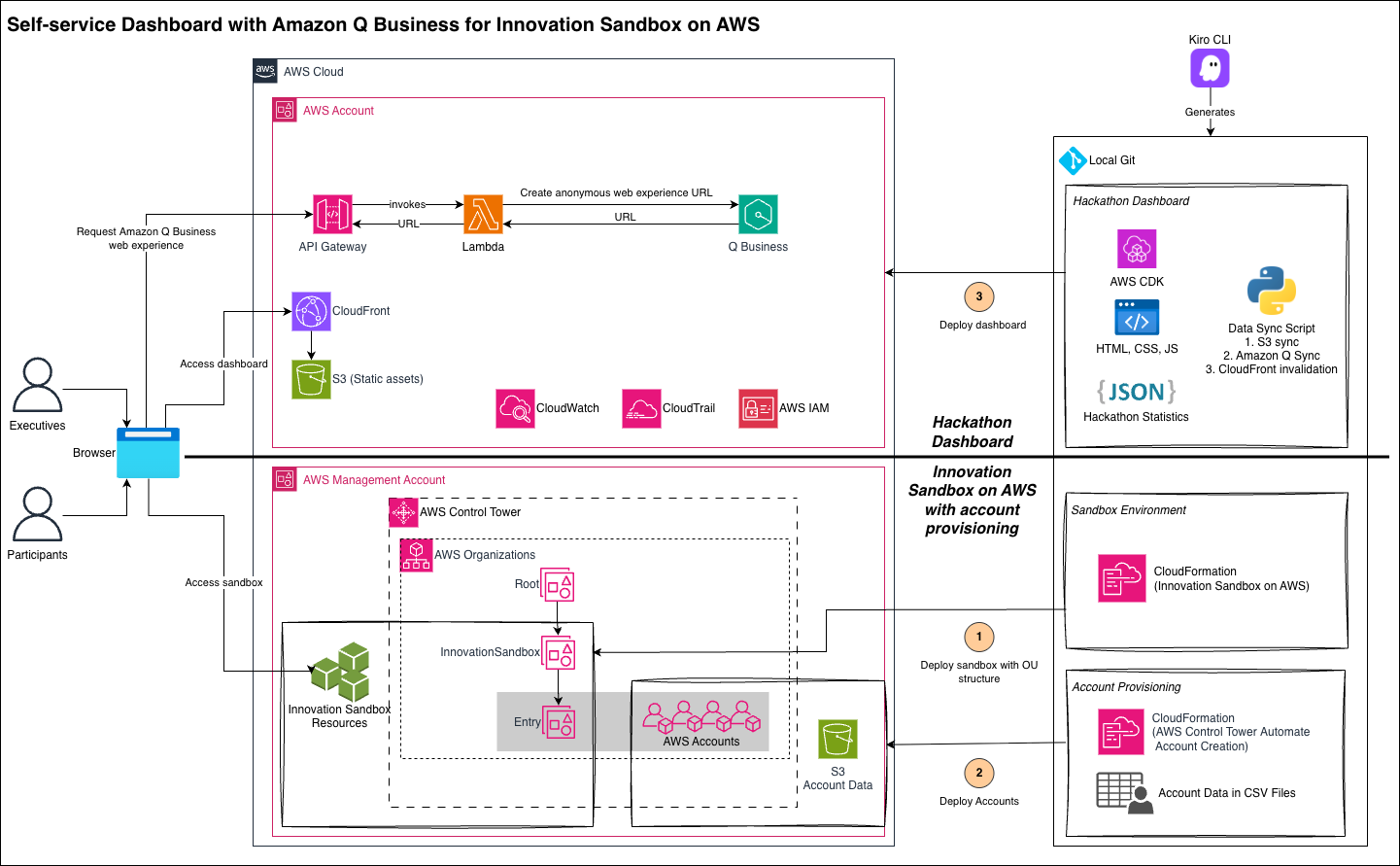
1. Innovation Sandbox on AWS Foundation
We deployed Innovation Sandbox on AWS to provide essential infrastructure for managing temporary AWS accounts at scale. The solution deploys a specific Organizational Units (OUs) called Entry where can be onboarded into the solution. We configured organizational units with pre-defined security policies, spending controls, and automated cleanup mechanisms. The sandbox environment included service control policies limiting access to sensitive services with optional time and budget controls, while enabling Generative AI experimentation with Amazon Bedrock, SageMaker, and other AI/ML.2. Automated Account Creation
We used AWS Control Tower Automate Account Creation in parallel to quickly deploy hundreds of accounts. This enabled batch account provisioning with enterprise controls. This CloudFormation-based solution uses AWS Service Catalog APIs to create multiple accounts simultaneously, reducing provisioning time from hours to minutes per account.3. Custom Analytics Dashboard
We built a custom dashboard to provide real-time insights, agenda, knowledge base and contact form with Amazon Q Business integration. The custom analytics dashboard combined data collection with Amazon Q Business integration for intelligent insights. The architecture used:- Static web hosting on S3 with CloudFront distribution
- Lambda functions for Amazon Q Business URL generation
- API Gateway for CORS-enabled endpoints
- JavaScript modules for real-time metric calculations
- Automated data aggregation for Amazon Q Business knowledge base
AWS Well-Architected Framework Alignment
The solution followed AWS Well-Architected Framework principles:- Operational Excellence: Automated provisioning and real-time monitoring reduced manual effort.
- Security: Pre-configured policies and isolated sandbox accounts protected resources.
- Cost Optimization: Automated cleanup and spending controls minimized waste.
- Performance Efficiency: Parallelized account creation accelerated deployment.
- Sustainability: Automated decommissioning reduced idle resource consumption.
Walkthrough
Working closely with the customer’s cloud and AI teams, we rapidly iterated on the account provisioning strategy to meet their specific security and governance requirements, all within 3 days.Setting Up the Sandbox Environment
We followed the Innovation Sandbox on AWS Implementation Guide including prerequisites for Resource Access Manager (RAM) for cross-account sharing and Amazon Simple Email Service (Amazon SES) for participant notifications. We configured AppConfig with related company data and created a single lease for participants to use. A single person managed both administrator (for account pool and settings management) and manager (for lease templates and approvals) roles, streamlining operations.Provisioning the Accounts
We deployed the AWS Control Tower Automate Account Creation stack in the management account, configuring it to provision accounts into a dedicated “Entry” organizational unit deployed by Innovation Sandbox on AWS. To meet the 3-day timeline, we parallelized the provisioning by deploying multiple CloudFormation stacks simultaneously—each stack handling a subset of accounts. This approach doubled our provisioning throughput, creating 246 AWS accounts for 213 confirmed participants in under 4 hours instead of the longer time needed for sequential processing. We generated different CSV files containing information for 400 dummy accounts, each with a unique account name, dedicated email address, SSO email, username for access, and the specific organizational unit for the account. We placed CSV files in an S3 bucket for the automation to access. We then deployed BatchAccountCreation.yaml CloudFormation stack for each CSV file, which processed the corresponding accounts file, creating each account accordingly. This system allowed us to focus on other tasks while the accounts were being created.Building the Monitoring Dashboard
The dashboard provided a web-based interface, enabling participants to:- View quick-start guides and tutorials
- Visualize key metrics and participants information
- Show agenda and demos
- Send use-case submissions to request additional support
- Get AI-powered assistance through embedded Amazon Q Business
[Role]
You are an AWS Solutions Architect expert in AWS CDK (Cloud Development Kit) and serverless dashboard architectures.
[Task]
Generate a complete AWS CDK application in TypeScript that provisions secure dashboard hosting with Q Business API integration and CloudFront distribution.
[Code Output Format]
- TypeScript CDK stack with proper construct dependencies
- Minimal IAM permissions following least privilege principle
- Stack outputs for deployment automation integration
[Requirements]
- S3: Private bucket with versioning, blocked public access using BucketDeployment
- CloudFront: Distribution with Origin Access Identity, API Gateway integration
 Lambda Function: Python function construct for Q Business URL generation with boto3
- API Gateway: LambdaRestApi with CORS configuration for /qbusiness-url endpoint
- Security: Role constructs with minimal qbusiness:CreateAnonymousWebExperienceUrl permissions
[Instructions]
1. MUST use OriginAccessIdentity construct for S3-CloudFront security
2. MUST implement BehaviorOptions: S3 for static files, API Gateway for /api/* paths
3. MUST configure CorsOptions for browser API requests
4. MUST export CfnOutput for bucket name, CloudFront URL, distribution ID
5. DO NOT use overly permissive PolicyStatement - scope to specific Q Business application ARN
[Success Criteria]
- CDK stack deploys successfully with cdk deploy in any AWS region
- S3 bucket remains private with CloudFront-only access via OAI
- API Gateway returns valid Q Business URLs with proper CORS headers
- All stack outputs available for deployment automation scripts
Data Collection
We followed a GitOps approach to update data—a single JSON file served as the source of truth, with datapoints automatically cross-tested to detect failures early. The dashboard used this aggregated data to update Amazon Q Business document, and provide real-time calculations/presentation from static website. The data was updated continuously during the Hackathon. Our dashboard aggregated data from multiple sources to provide comprehensive event visibility. Session attendance tracked through virtual meeting platforms. Real-time engagement was calculated from session participation. Working with the customer’s Lead Cloud Architect, we collected AWS account cost metrics from Organization Unit (OU) where account exists, and Kiro Pro subscriptions count from Kiro dashboard. Innovation Sandbox on AWS provided isolated Organizational Unit (OU)s which made the calculation easy. Example prompt for real-time data processing engine:[Role]
You are a data processing specialist creating real-time analytics engines for executive dashboards with trend analysis.
[Task]
Build a JavaScript module that processes hackathon session data, calculates KPIs, and generates dynamic UI components with
statistical analysis.
[Code Output Format]
- Modular JavaScript functions for data calculations
- JSON data structure as centralized source of truth
- Dynamic DOM manipulation for real-time updates
[Requirements]
- Peak Calculations: Technical session peak, non-technical peak from session data
- Trend Analysis: Day-over-day percentage changes with directional indicators
- KPI Generation: Engagement rate (53%), AWS adoption (21%), Kiro Pro conversion (7%)
- Dynamic Rendering: Session cards with participant counts and click handlers
- Data Structure: Comprehensive data.json with sessions, accounts, and statistics
[Instructions]
1. MUST calculate all statistics from data.json - no hardcoded values
2. MUST implement percentage change calculations with null value handling
3. MUST generate session cards dynamically with modal integration
4. MUST validate data consistency across all calculations
5. DO NOT duplicate data - maintain single source of truth in JSON structure
[Success Criteria]
- All KPIs calculate correctly from source data
- Percentage trends display proper directional indicators (↑↓)
- Session cards render dynamically with accurate participant counts
- Data validation prevents calculation errors and handles edge cases
- Peak session attendance (technical vs. business tracks)
- Day-over-day engagement trends
- AWS service adoption rates
- Kiro subscription metrics
- Account utilization and spending patterns
- AWS Spending Increases: Translated as “more complex solutions using advanced services” and “indicates solution complexity and innovation depth”
- Kiro Adoptions: Explained as “participants adopting advanced development tools” that “accelerates development cycles and builds enterprise-grade AI skills”.
- Account Usage Growth: Clarified as “more participants joining hands-on development” providing “practical cloud development experience”.
|
Kiro Pro metric explanation
|
AWS Accounts metric explanation
|
AWS Spending metric explanation
|
Knowledge Base and Self-Service Resources
Beyond metrics tracking, the dashboard ecosystem included three critical self-service components that reduced administrative overhead while improving participant experience. The Wiki served as a knowledge base with quick links to essential tools, setup guides, and frequently asked questions, becoming the first line of information sharing among participants during sessions. The interactive Agenda helped users navigate the complex 5-day schedule across technical and business tracks, with Amazon Q Business integration providing personalized session recommendations based on participant roles and interests. The Submit Use Case form enabled teams to request additional AWS expert support directly, connecting promising projects with specialized technical guidance. Example prompt for executive dashboard with real-time KPIs:[Role]
You are a senior full-stack developer specializing in AWS-themed executive dashboards and real-time data visualization.
[Task]
Create a comprehensive executive dashboard HTML page that displays hackathon metrics with interactive KPI cards, day-by-day session tracking, and modal functionality.
[Code Output Format]
- Single HTML file with embedded CSS and JavaScript
- Modular functions for data processing and UI updates
- Responsive design optimized for executive viewing
[Requirements]
- AWS Design System: Use #232F3E dark blue, #FF9900 orange, Amazon Ember font
- KPI Cards: Peak Technical Session (82), Peak Non-Technical (353), Engagement Rate (73%), AWS Adoption (41%), Kiro Pro Adoption (70%)
- Daily Tracking: 5-day sections with session cards showing participant counts
- Interactive Elements: Clickable session cards opening detailed modals
- Data Source: Load all metrics from data.json as single source of truth
[Instructions]
- MUST implement CSS Grid layout with hover effects and smooth transitions
- MUST calculate day-over-day percentage changes with trend indicators (↑↓)
- MUST create modal system with session details (time, track, format, description)
- MUST handle null participant values gracefully
- DO NOT hardcode any metrics - calculate from centralized JSON data
[Success Criteria]
- All KPIs display with correct trend calculations
- Session modals open smoothly with complete information
- Mobile responsive design works on 320px+ screens
- Real-time updates when data.json changes
|
Use case submission
|
Interactive Agenda
|
Wiki Page
|
Amazon Q Business Integration
The dashboard included embedded Amazon Q Business for intelligent event assistance as chatbot. It worked by client showing “Talk to Dashboard” icon on bottom right of the screen. Once clicked, the client sent a request the API (lambda) that creates a temporary Amazon Q Business URL and once the client received the URL, it dynamically created an iframe that would display the Amazon Q Business interface. Example prompt for business AI chat integration:[Role]
You are a frontend integration specialist expert in Amazon Q Business and responsive iframe implementations.
[Task]
Create a JavaScript module that integrates Amazon Q Business chat with dynamic URL fetching, responsive UI, and session
management.
[Code Output Format]
- Standalone JavaScript module with CSS styling
- API integration for Q Business URL generation
- Mobile-responsive iframe with error handling
[Requirements]
- Toggle Button: Bottom-right "Ask Q about Hackathon " with AWS orange styling
- Dynamic URLs: Fetch fresh Q Business URLs from /api/qbusiness-url to avoid expiration
- Responsive Design: Full-width iframe on mobile (<480px), fixed positioning on desktop
- State Management: Toggle between "Ask Q" and "Close Chat" button states
- Error Handling: Loading indicators, API failure messages, session recovery
[Instructions]
1. MUST fetch new Q Business URL on each chat session opening
2. MUST implement responsive iframe: 450px max-width desktop, full-width mobile
3. MUST show loading indicator during URL generation API calls
4. MUST handle API failures with user-friendly error messages
5. DO NOT cache Q Business URLs - always request fresh URLs for security
[Success Criteria]
- Chat toggles smoothly between open/closed states
- Mobile devices display chat interface properly without overflow
- API failures show helpful messages instead of breaking functionality
- Q Business iframe loads successfully with dashboard contextCleanup and Cost Management
Account Decommissioning
Post hackathon, Innovation Sandbox’s automated cleanup mechanisms and options handled account lifecycle management:- Frozen Accounts: Innovation Sandbox automatically revoked user access to AWS accounts after 14 days, while administrators retained access for evaluation
- Automated Cleanup: Innovation Sandbox automatically deleted account resources after 21 days, unless explicitly preserved.
- Account Ejection: We’ve moved promising projects to permanent accounts, preserving all resources.
Cost Optimization Considerations
- We’ve configured Innovation Sandbox budget alerts at USD $50 and USD $100 thresholds
- We’ve used pre-configured service control policies from Innovation Sandbox on AWS preventing expensive resource types
- We’ve used automated resource tagging for cost allocation
- We’ve used the analytics dashboard for spending visibility
Results and Conclusion
The solution delivered measurable results across all dimensions, demonstrating how Innovation Sandbox on AWS can be enhanced with custom analytics to transform enterprise innovation events. Peak engagement reached 153 participants in keynote sessions, with 41 participants in hands-on technical workshops—representing a 53% technical engagement rate.Key Metrics and Outcomes
Infrastructure Performance:- 246 AWS accounts provisioned in under 4 hours
- Zero security incidents or policy violations
- Average account setup time reduced from 2+ hours to seconds
- Total infrastructure costs under USD $2,000 with 89% of accounts staying within USD $100 budget limits
- Internal data governance maintained – All accounts remained under the customer’s enterprise control, enabling AI development with internal data
- 21% adopted new AWS AI services
- 7% started using Kiro
- Amazon Bedrock used in 71% of AWS-based projects
- 34% of business track attendees created functional prototypes
Dashboard Impact and Adoption
The analytics dashboard served three critical phases: pre-event logistics and account access communication, real-time monitoring during the event, and post-event executive reporting for ROI analysis. As one director noted: “We love the dashboard, I personally refreshed it 20 times daily.” This visibility enabled leadership to make data-driven decisions about resource allocation and future innovation initiatives.Success Factors and Reusability
Key success factors included leveraging existing AWS solutions as foundations, building modular analytics for reusability, and integrating Amazon Q Business for intelligent assistance. The self-service approach reduced administrative overhead while empowering participants to extend their learning beyond the event timeline. The patterns demonstrated here are reusable across hackathons, training programs, and innovation labs of any scale. Innovation Sandbox on AWS provides the secure foundation, while custom analytics transforms visibility and engagement measurement.Ready to Run Your Innovation Events?
Are you ready to upskill your team and push the limits of what’s possible? Enable them to innovate by giving them secure AWS accounts in minutes on-demand, providing self-service access to the information they need. Let leadership see results in real-time and support you. Turn your next innovation event into a launchpad for production-ready solutions. Start with Innovation Sandbox on AWS and enhance it with custom analytics tailored to your organization’s needs. The combination of automated provisioning, real-time analytics, and AI-powered assistance creates streamlined experiences that enable participants to focus on innovation rather than infrastructure. Next Steps: Acknowledgments: Thanks to Shu Jackson, Rakshana Balakrishnan, Todd Gruet, and Kevin Hargita from the AWS Innovation Sandbox team for their support during this project.Enjoyed this article? Sign up for our newsletter to receive regular insights and stay connected.