
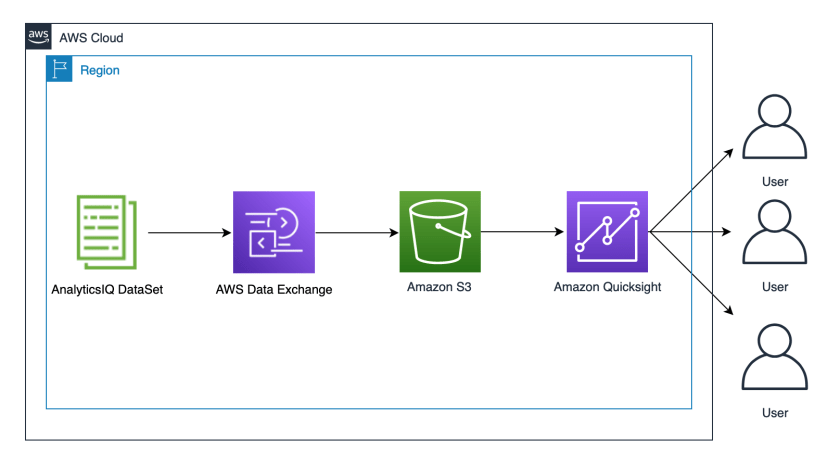
The practical value here is not the sample health dataset itself, but the way it turns a packaged data product into an accessible analytic workflow. By moving AnalyticsIQ data through AWS Data Exchange, S3, and QuickSight, the setup replaces bespoke ETL and reporting stacks with a managed path from subscription to visualization. For practitioners, that matters because it lowers the barrier to exploratory analysis while preserving enough structure to support decision-making around social determinants and population-level health patterns.
The mechanism is straightforward: subscribe to the dataset, export it into an S3 bucket, then let QuickSight ingest the files through a JSON connection definition and build visuals from fields such as ethnicity, automobile ownership, urgent-care visits, and wellness scores. The architecture is deliberately lightweight, but its significance lies in the joins it implies between distribution channels, storage, and BI. It demonstrates how governed external data can be operationalized without standing up a dedicated analytics pipeline.
The limitations are equally important. The post treats correlations as prompts for inquiry, not proof of causation, so transportation access or job satisfaction should not be overread from a few charts. The approach also depends on correct bucket configuration, subscription setup, and disciplined cleanup to avoid costs. Its real significance is narrower than the promotional framing: it is a low-friction way to make third-party data visible, not a substitute for validation, domain expertise, or stronger statistical analysis.
Solution overview
The following architecture diagram outlines the components of this solution: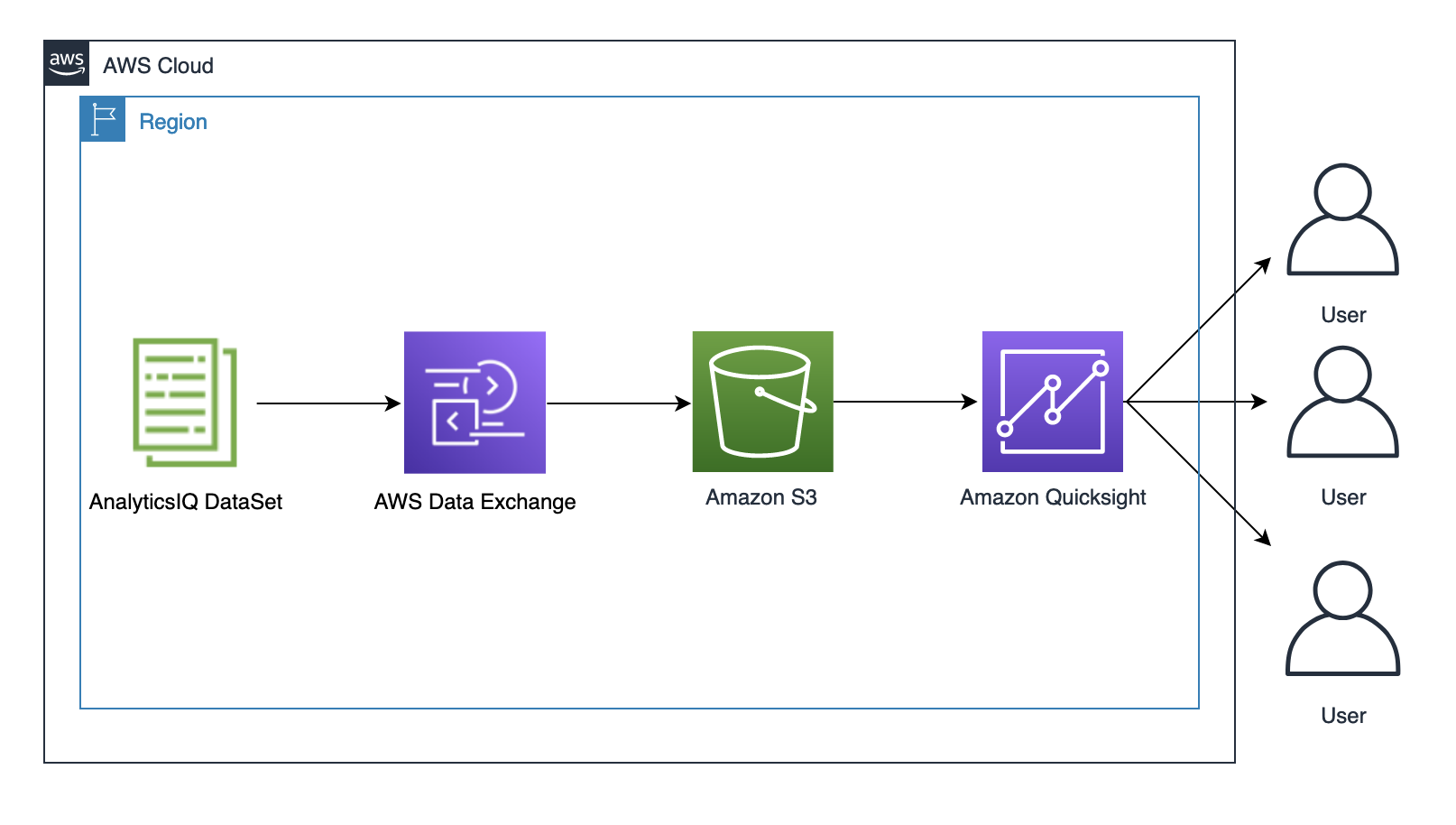
- The AnalyticsIQ Social Determinants of Health Sample Data dataset to demonstrate an example of the impact of social determinants on health and wellness. This dataset is listed as AnalyticsIQ in the Extended Provider Program.
- AWS Data Exchange to subscribe to the sample AnalyticsIQ dataset from AWS Marketplace.
- An Amazon Simple Storage Service bucket to store the AnalyticsIQ sample dataset.
- QuickSight enterprise edition to generate visualizations using the sample dataset.
- Export the dataset to an S3 bucket.
- Sign up for a QuickSight subscription.
- Create a QuickSight dataset.
- Create visualizations in QuickSight.
Prerequisites
To run this solution, you must have an AWS account. If you don’t already have one, you can create one.Export the dataset to an S3 bucket
To start working with your dataset, you must subscribe to the dataset and then export the data to an S3 bucket. Complete the following steps:- If you don’t already have a bucket, navigate to the Amazon S3 console, and choose Create bucket.
- Give a unique name for your bucket.
us-east-1 Region.
- To subscribe to the sample dataset, follow this Original Postroducts/prodview-aq6mgco2k6sa4" target="_blank" rel="noopener noreferrer">link. On the AWS Data Exchange console, choose Continue to subscribe.
- On the Complete subscription page, choose Subscribe.
- For Select Amazon S3 bucket folder destination, choose your S3 bucket.
- On the AWS Data Exchange Console, under My subscriptions in the navigation pane, choose Entitled Data.
- Under Products, expand Social Determinants of Health Sample Data – Offline, and choose the AnalyticsIQ sample dataset.
- On the Revisions tab, select the revision and choose Export to Amazon S3.

- Enter the name of the S3 bucket you created for this dataset.
- Leave the other options as default.
- Choose Export.
Sample-Data.
Sign up for a QuickSight subscription
To sign up for a QuickSight subscription, complete the following steps:- On the AWS Management Console, open QuickSight.
- Choose Sign up for QuickSight and choose Enterprise.
- For QuickSight account name, enter a unique name.
- Enter a valid email.
- Under Allow access and autodiscovery for these resources, select Amazon S3 and choose Select S3 buckets.

- Choose the S3 bucket that you created earlier, and choose Finish.
- After your QuickSight account is created, choose Go to QuickSight account.
Create a QuickSight dataset
To create your dataset, complete the following steps:- Using a local text editor, create a JSON file. Copy the following content and replace the placeholder with the name of the bucket that you created earlier:
{ "fileLocations": [ { "URIPrefixes": [ "https://<Your BucketName>.s3.amazonaws.com/Sample-Data/" ] } ], "globalUploadSettings": { "format": "TSV" } } - On the QuickSight console, choose New data set on the Datasets page.
- Choose S3.
- For DataSource, enter a name.
- Choose Upload and upload the JSON file.
- Choose Connect.
- Choose Visualize.

Create visualizations in QuickSight
Let’s visualize the average number of cars by various ethnic groups. For more information about the fields, refer to the Key Data Points section on the AWS Marketplace listing.- Choose the sheet and choose the vertical bar chart under Visual types.
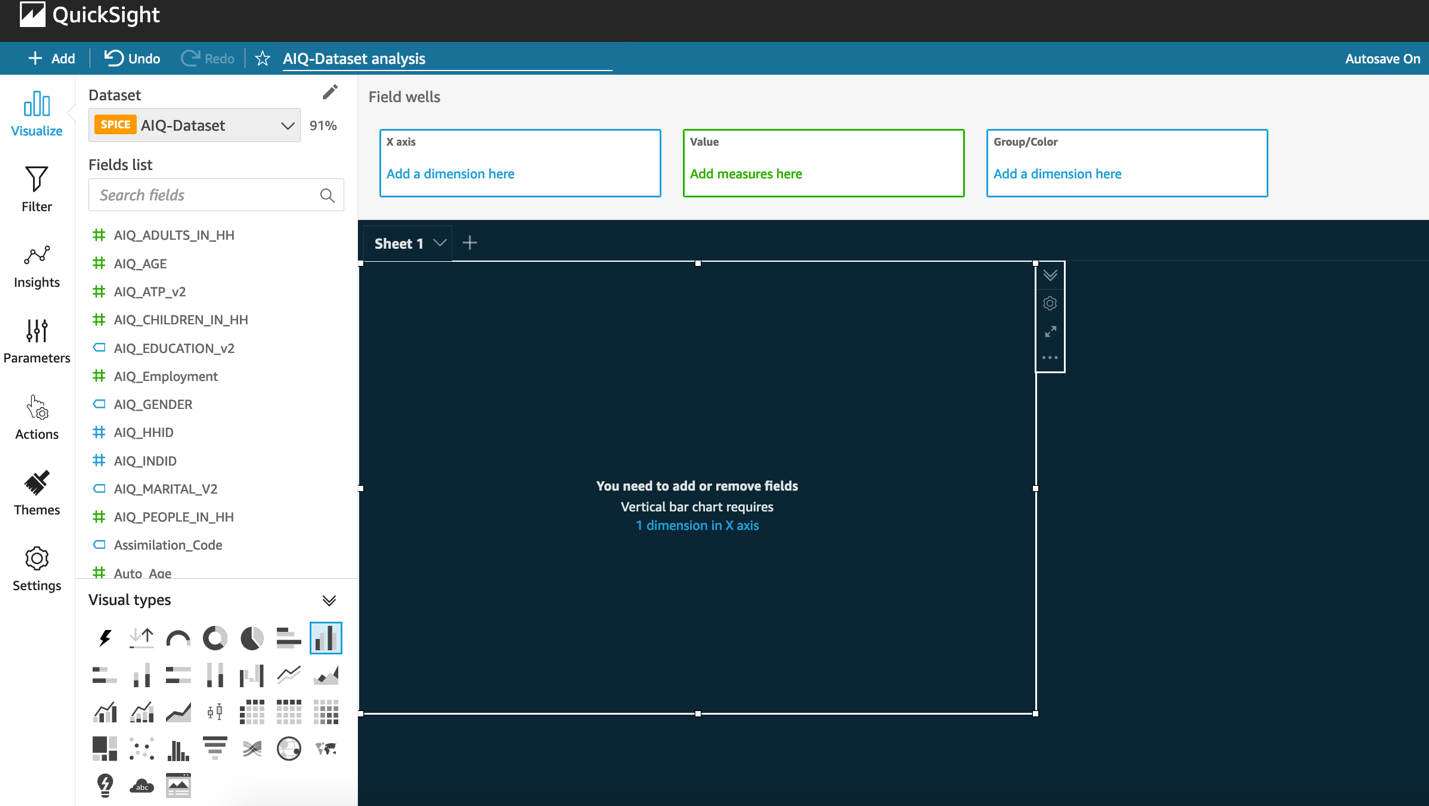
- From the Fields list, drag EthnicIQ_v2 to X axis and Number_of_Autos to Value.
- Choose Aggregate as Average.
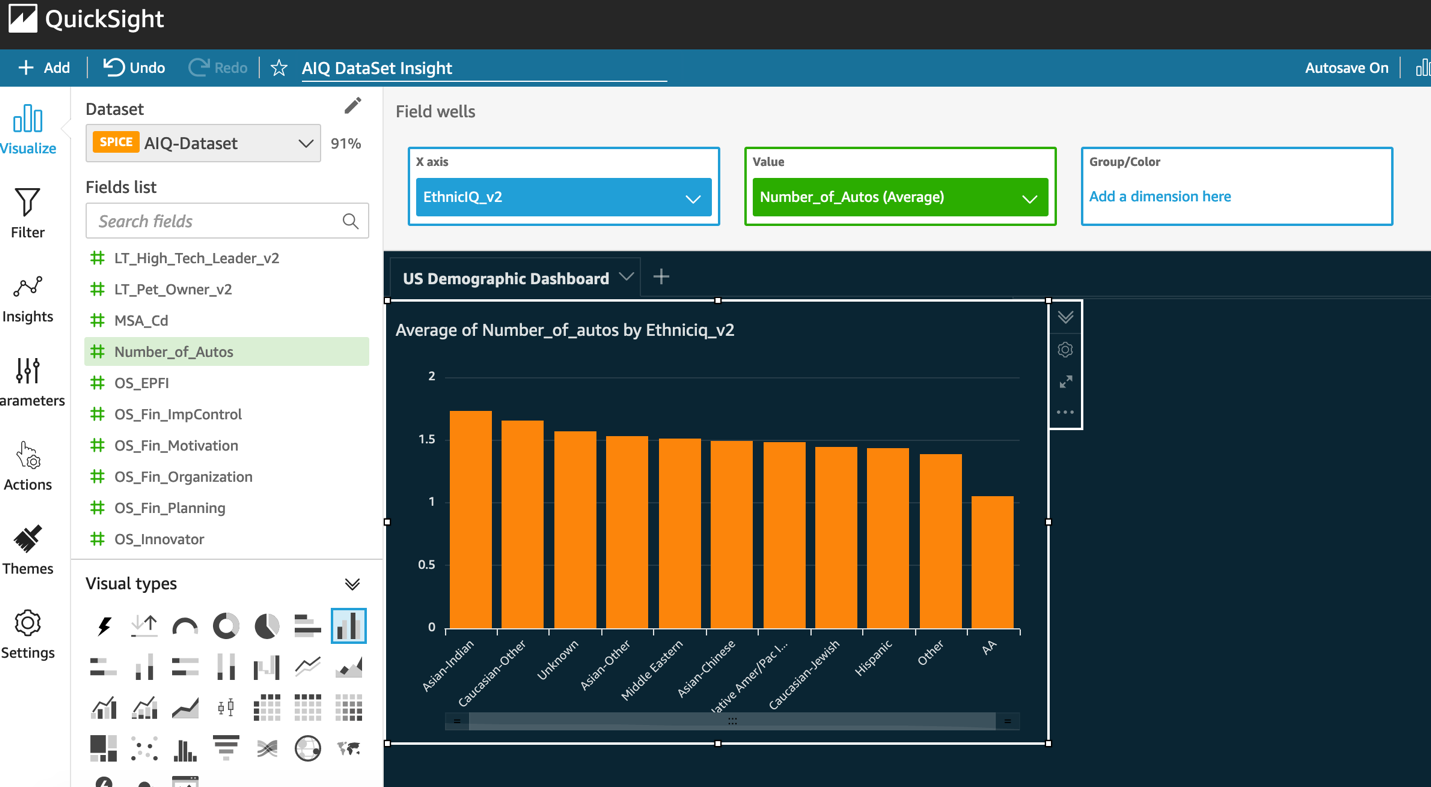
- Choose +Add, and choose Add Visual.
- Choose a pivot table under Visual types.
- From the Fields list, drag EthinicIQ_v2 to Rows and HW_Urgent_Care_Visits_SC to Values.
- Choose Aggregate as Average.
- Choose the HW_Urgent_Care_Visits_SC field in the pivot table, and choose Sort descending.


Clean up
To avoid incurring ongoing charges, complete the following steps to clean up your resources:- On the QuickSight console, on the Analyses page, choose the details icon on the analysis you created, and choose Delete.
- On the QuickSight start page, on the Datasets page, choose the dataset that you created earlier, then choose Delete Data Set.
- On the Amazon S3 console, on the Buckets page, select the option next to the name of your bucket, and then choose Delete at the top of the page.
- Confirm that you want to delete the bucket by entering the bucket name into the text field, then choose Delete bucket.
Conclusion
In this post, we showed you how you can use the AnalyticsIQ Social Determinants of Health Sample Data dataset to gain insights into society’s health and wellness. We also showed you how you can generate easy-to-understand visualizations using QuickSight. Amazon QuickSight allows dashboards to be shared with 1000s of users without any servers, and with pay-per-session pricing. QuickSight dashboards can also be easily embedded in SaaS applications or corporate portals for sharing insights with all users. You can explore the AnalyticsIQ dataset more on the AWS Data Exchange console. For queries related to the AnalyticsIQ dataset, you can reach out directly to the support team at [email protected].To learn more about the features of QuickSight, refer to Amazon QuickSight Features.About the Author
Sumitha AP is an AWS Solutions Architect based in Washington DC. She works with SMB customers to help them design secure, scalable, reliable and cost effective solutions in the AWS cloud.Enjoyed this article? Sign up for our newsletter to receive regular insights and stay connected.