

Running Microsoft SQL database service on Amazon EC2 with high availability
This option is the least invasive to existing operations models. It gives you a quick start to modernize Microsoft SQL database service by leveraging the AWS Cloud to manage services like physical facilities. The low-level infrastructure operational tasks—such as server rack, stack, and maintenance—are managed by AWS. You have full control of the database and operating-system–level access, so there is a choice of tools to manage the operating system, database software, patches, data replication, backup, and restoration. You can use any Microsoft SQL Server-supported replication technology with your Microsoft SQL Server database on Amazon EC2 to achieve high availability, data protection, and disaster recovery. Common solutions include log shipping, database mirroring, Always On availability groups, and Always On Failover Cluster Instances.High availability in a single Region
Figure 1 shows how you can use Microsoft SQL Server on Amazon EC2 across multiple Availability Zones (AZs) within single Region. The interconnects among AZs that are similar to your data center intercommunications are managed by AWS. The primary database is a read-write database, and the secondary database is configured with log shipping, database mirroring, or Always On availability groups for high availability. All the transactional data from the primary database is transferred and can be applied to the secondary database asynchronously for log shipping, and it can either asynchronously or synchronously for Always On availability groups and mirroring.
Figure 1. High availability in a single Region with Microsoft SQL database service on Amazon EC2
High availability across multiple Regions
Figure 2 demonstrates how to configure high availability for Microsoft SQL Server on Amazon EC2 across multiple Regions. A secondary Microsoft SQL Server in a different Region from the primary is configured with log shipping, database mirroring, or Always On availability groups for high availability. The transactional data from primary database is transferred via the fully managed backbone network of AWS across Regions.
Figure 2. High availability across multiple Regions with Microsoft SQL database service on Amazon EC2
Replatforming Microsoft SQL Database Service on Amazon RDS with high availability
Amazon RDS is a managed database service and responsible for most management tasks. It currently supports Multi-AZ deployments for SQL Server using SQL Server Database Mirroring (DBM) or Always On Availability Groups (AGs) as a high-availability, failover solution.High availability in a single Region
Figure 3 demonstrates the Microsoft SQL database service that is run on Amazon RDS is configured with a multi-AZ deployment model in single region. Multi-AZ deployments provide increased availability, data durability, and fault tolerance for DB instances. In the event of planned database maintenance or unplanned service disruption, Amazon RDS automatically fails-over to the up-to-date secondary DB instance. This functionality lets database operations resume quickly without manual intervention. The primary and standby instances use the same endpoint, whose physical network address transitions to the secondary replica as part of the failover process. You don’t have to reconfigure your application when a failover occurs. Amazon RDS supports multi-AZ deployments for Microsoft SQL Server by using either SQL Server database mirroring or Always On availability groups.
Figure 3. High availability in a single Region with Microsoft SQL database service on Amazon RDS
High availability across multiple Regions
Figure 4 depicts how you can use AWS Database Migration Service (AWS DMS) to configure continuous replication among Microsoft SQL Database Service on Amazon RDS across multiple Regions. AWS DMS needs Microsoft Change Data Capture to be enabled on the Amazon RDS for the Microsoft SQL Server instance. If problems occur, you can initiate manual failovers and reinstate database services by promoting the Amazon RDS read replica in a different Region.
Figure 4. High availability across multiple Regions with Microsoft SQL database service on Amazon RDS
Refactoring Microsoft SQL database service on Amazon Aurora with high availability
This option helps you to eliminate the cost of SQL database service license. You can run database service on a truly cloud native modern database architecture. You can use AWS Schema Conversion Tool to assist in the assessment and conversion of your database code and storage objects. Any objects that cannot be automatically converted are clearly marked so they can be manually converted to complete the migration. The Aurora architecture involves separation of storage and compute. Aurora includes some high availability features that apply to the data in your database cluster. The data remains safe even if some or all of the DB instances in the cluster become unavailable. Other high availability features apply to the DB instances. These features help to make sure that one or more DB instances are ready to handle database requests from your application.High availability in a single Region
Figure 5 demonstrates Aurora stores copies of the data in a database cluster across multiple AZs in single Region. When data is written to the primary DB instance, Aurora synchronously replicates the data across AZs to six storage nodes associated with your cluster volume. Doing so provides data redundancy, eliminates I/O freezes, and minimizes latency spikes during system backups. Running a DB instance with high availability can enhance availability during planned system maintenance, such as database engine updates, and help protect your databases against failure and AZ disruption.
Figure 5. High availability in a single Region with Amazon Aurora
High availability across multiple Regions
Figure 6 depicts how you can set up Aurora global databases for high availability across multiple Regions. An Aurora global database consists of one primary Region where your data is written, and up to five read-only secondary Regions. You issue write operations directly to the primary database cluster in the primary Region. Aurora automatically replicates data to the secondary Regions using dedicated infrastructure, with latency typically under a second.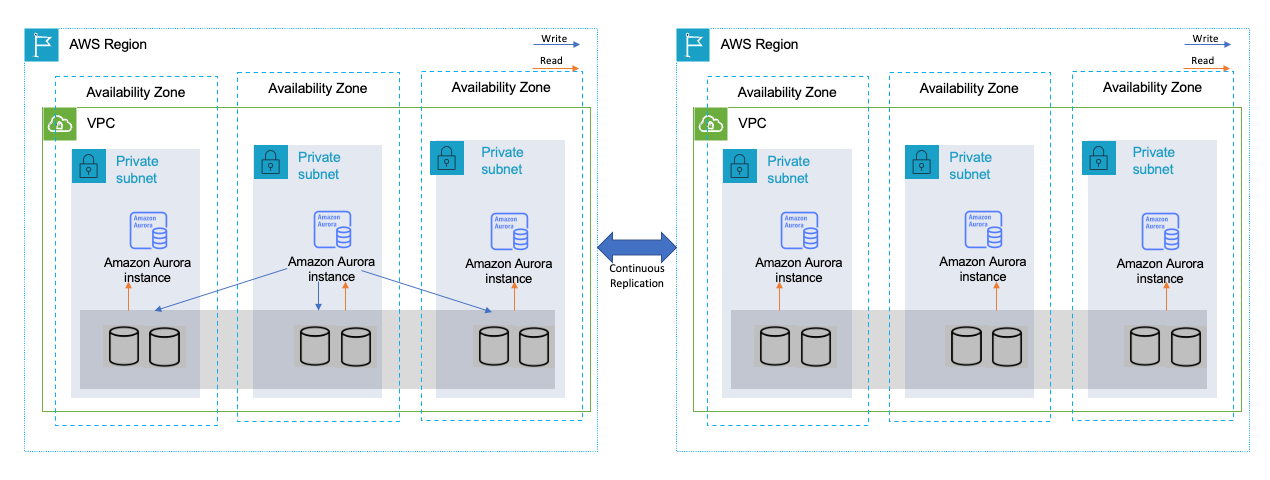
Figure 6. High availability across multiple Regions with Amazon Aurora global databases
Summary
You can choose among the options of Amazon EC2, Amazon RDS, and Amazon Aurora when modernizing SQL database service on AWS. Understanding the features required by business and the scope of service management responsibilities are good starting points. When presented with multiple options that meet with business needs, choose one that will allow more focus on your application, business value-add capabilities, and help you to reduce the services’ “total cost of ownership”.Enjoyed this article? Sign up for our newsletter to receive regular insights and stay connected.