
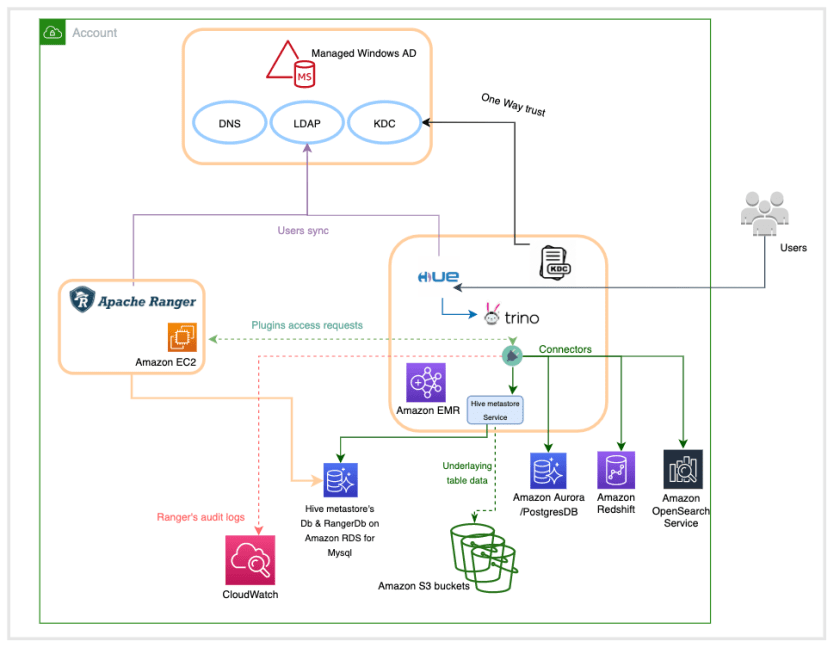
The practical value here is not query federation by itself, but the ability to pair a single SQL entry point with centralized authorization in a fragmented data domain. Trino supplies cross-engine access, while Apache Ranger supplies policy enforcement and audit trails, turning multiple purpose-built systems into something that can be governed coherently. For teams moving toward a data mesh, that matters because autonomy without control quickly becomes operational sprawl; centralized policy on top of distributed ownership is the real architectural payoff.
The implementation hinges on a federated identity and policy chain: Windows AD provides user identities, Kerberos binds users to the EMR cluster, Ranger stores policies in MySQL on RDS, and Trino loads a dedicated Ranger plugin on EMR 6.7. That matters because policy enforcement is pushed into the query path, where it can control database-, table-, row-, and column-level access across engines such as Redshift and Hive. The hue user impersonation step is powerful, but it also concentrates trust.
The limitations are operationally significant, not cosmetic. Non-Kerberos clusters are excluded, audit visibility shifts to CloudWatch rather than the Ranger UI, and Glue Data Catalog is not supported as the Hive metastore. The setup also depends on certificates, log groups, and correctly aligned realm or service-definition settings, so failure modes are often configuration rather than product defects. For practitioners, the message is clear: federated governance is achievable, but it introduces a brittle integration surface that requires disciplined maintenance.
Managing data through a central data platform simplifies staffing and training challenges and reduces the costs. However, it can create scaling, ownership, and accountability challenges, because central teams may not understand the specific needs of a data domain, whether it’s because of data types and storage, security, data catalog requirements, or specific technologies needed for data processing. One of the architecture patterns that has emerged recently to tackle this challenge is the data mesh architecture, which gives ownership and autonomy to individual teams who own the data. One of the major components of implementing a data mesh architecture lies in enabling federated governance, which includes centralized authorization and audits.
Apache Ranger is an open-source project that provides authorization and audit capabilities for Hadoop and related big data applications like Apache Hive, Apache HBase, and Apache Kafka.
Trino, on the other hand, is a highly parallel and distributed query engine, and provides federated access to data by using connectors to multiple backend systems like Hive,
Redshift, and Amazon OpenSearch Service. Trino acts as a single access point to query all data sources.
By combining Trino query federation features with the authorization and audit capability of Apache Ranger, you can enable federated governance. This allows multiple purpose-built data engines to function as one, with a single centralized place to manage data access controls.
This post shares details on how to architect this solution using the new EMR Ranger Trino plugin on Amazon EMR 6.7.
Solution overview
Trino allows you to query data in different sources, using an extensive set of connectors. This feature enables you to have a single point of entry for all data sources that can be queried through SQL.
The following diagram illustrates the high-level overview of the architecture.
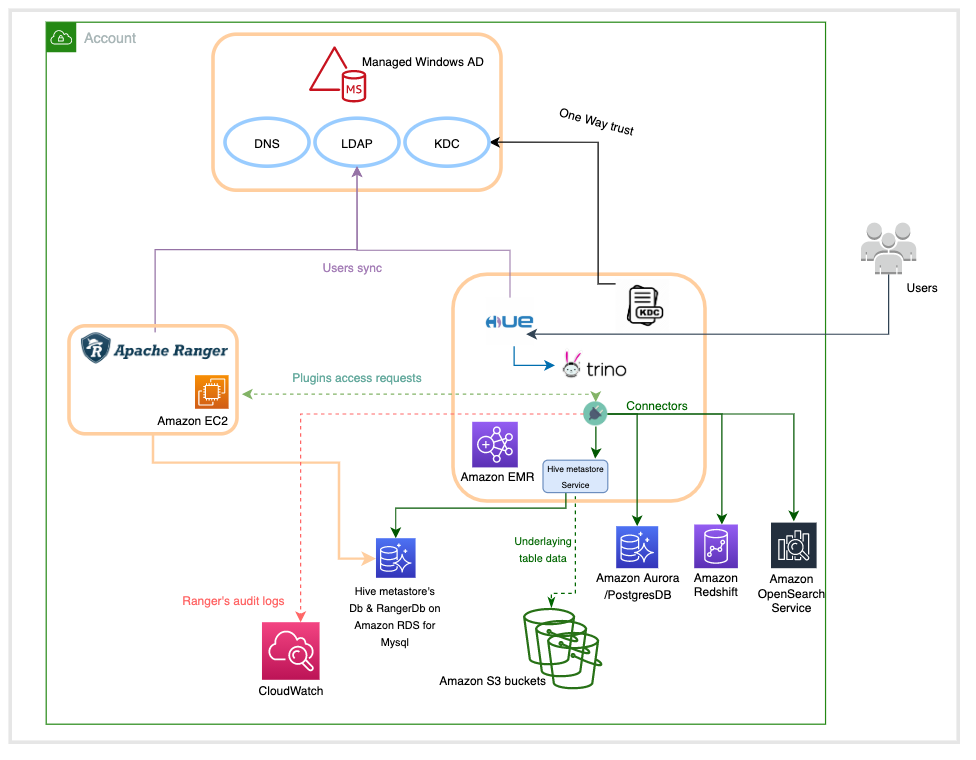
This architecture is based on four major components:
- Windows AD, which is responsible for providing the identities of users across the system. It’s mainly composed of a key distribution center (KDC) that provides kerberos tickets to AD users to interact with the EMR cluster, and a Lightweight Directory Access Protocol (LDAP) server that defines the organization of users in logical structures.
- An Apache Ranger server, which runs on an Amazon Elastic Compute Cloud (Amazon EC2) instance whose lifecycle is independent from the one of the EMR cluster. Apache Ranger is composed of a Ranger admin server that stores and retrieves policies in and from a MySQL database running in Amazon Relational Database Service (Amazon RDS), a usersync server that connects to the Windows AD LDAP server to synchronize identities to make them available for policy settings, and an optional Apache Solr server to index and store audits.
- An Amazon RDS for MySQL database instance used by the Hive metastore to store metadata related to the tables schemas, and the Apache Ranger server to store the access control policies.
- An EMR cluster with the following configuration updates:
- Apache Ranger security configuration.
- A local KDC that establishes a one-way trust with Windows AD in order to have the Kerberized EMR cluster recognize the user identities from the AD.
- A Hue user interface with LDAP authentication enabled to run SQL queries on the Trino engine.
- An Amazon CloudWatch log group to store all audit logs for the AWS managed Ranger plugins.
- (Optional) Trino connectors for other execution engines like Amazon Redshift, Amazon OpenSearch Service, PostgresSQL, and others.
Prerequisites
Before getting started, you must have the following prerequisites. For more information, refer to the Prerequisites and Setting up your resources sections in Introducing Amazon EMR integration with Apache Ranger.
- AWS Identity and Access Management (IAM) roles for Apache Ranger and other AWS services , and update to the Updates to the Amazon EC2 EMR role. For more information see IAM roles for native integration with Apache Ranger
- Certificates and private keys for Apache Ranger plugins and the Apache Ranger server uploaded to AWS Secrets Manager
- TLS/SSL mutual authentication enabled between the Apache Ranger server and Apache Ranger plugins running on the EMR cluster
- A self-managed Apache Ranger server (2.x only) outside of an EMR cluster
- A CloudWatch log group for Apache Ranger audits
- All Amazon EMR nodes, including core and task nodes, must be able to communicate with the Apache Ranger Admin servers, Amazon Simple Storage Service (Amazon S3), AWS Key Management Service (AWS KMS) if using EMRFS SSE-KMS, CloudWatch, and AWS Security Token Service (AWS STS).
To set up the new Apache Ranger Trino plugin, the following steps are required:
- Delete any existing Presto service definitions in the Apache Ranger admin server:
#Delete Presto Service Definition curl -f -u *<admin users login>*:*_<_**_password_ **_for_** _ranger admin user_**_>_* -X DELETE -k 'https://*<RANGER SERVER ADDRESS>*:6182/service/public/v2/api/servicedef/name/presto' - Download and add new Apache Ranger service definitions for Trino in the Apache Ranger admin server:
wget https://s3.amazonaws.com/elasticmapreduce/ranger/service-definitions/version-2.0/ranger-servicedef-amazon-emr-trino.json curl -u *<admin users login>*:*_<_**_password_ **_for_** _ranger admin user_**_>_* -X POST -d @ranger-servicedef-amazon-emr-trino.json \ -H "Accept: application/json" \ -H "Content-Type: application/json" \ -k 'https://*<RANGER SERVER ADDRESS>*:6182/service/public/v2/api/servicedef' - Create a new Amazon EMR security configuration for Apache Ranger installation to include Trino policy repository details. For more information, see Create the EMR security configuration.
- Optionally, if you want to use the Hue UI to run Trino SQL, add the
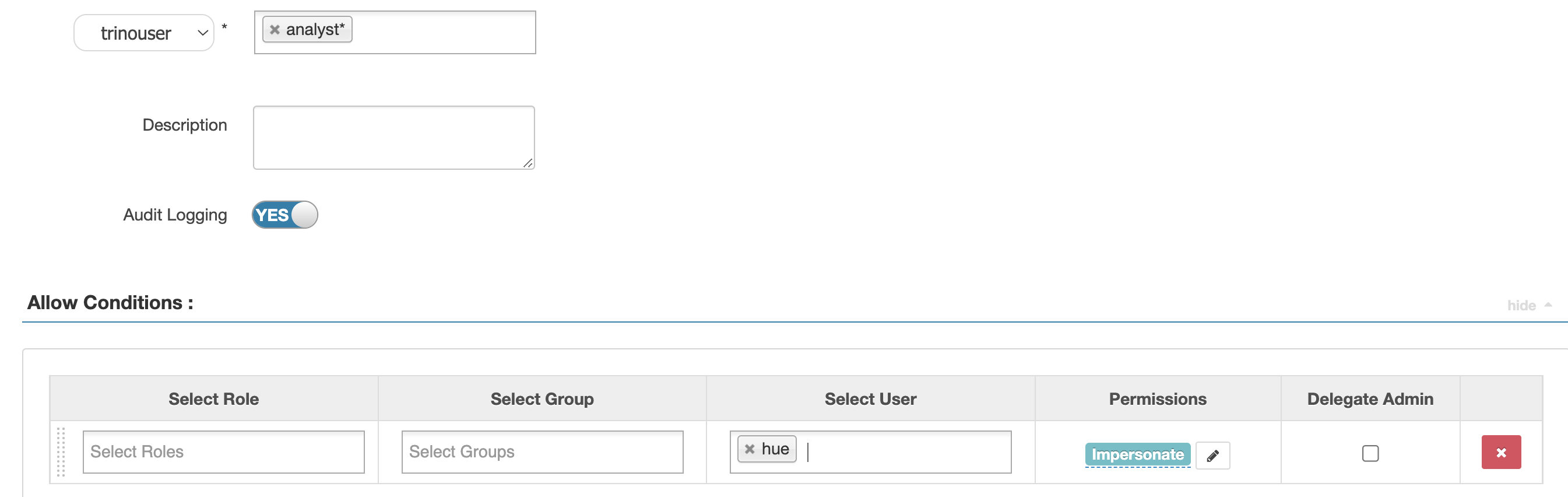
hueuser to the Apache Ranger admin server. Run the following command on the Ranger admin server:# Note: input parameter Ranger host IP address set -x ranger_server_fqdn=$1 RANGER_HTTP_URL=https://$ranger_server_fqdn:6182 cat > hueuser.json << EOF { "name": "hue1", "firstName": "hue", "lastName": "", "loginId": "hue1", "emailAddress" : null, "description" : "hue user", "password" : "user1pass", "groupIdList": [], "groupNameList": [], "status": 1, "isVisible": 1, "userRoleList": [ "ROLE_USER" ], "userSource": 0 } EOF #add users curl -u admin:admin -v -i -s -X POST -d @hueuser.json -H "Accept: application/json" -H "Content-Type: application/json" -k $RANGER_HTTP_URL/service/xusers/secure/users
After you add the hue user, it’s used to impersonate SQL calls submitted by AD users.
Warning: Impersonation feature should always be used carefully to avoid giving any/all users access to high privileges.
This post also demonstrates the capabilities of running queries against external databases, such as Amazon Redshift and PostgresSQL using Trino connectors, while controlling access at the database, table, row, and column level using the Apache Ranger policies. This requires you to set up the database engines you want to connect with. The following example code demonstrates using the Amazon Redshift connector. To set up the connector, create the file redshift.properties under /etc/trino/conf.dist/catalog on all Amazon EMR nodes and restart the Trino server.
- Create the
redshift.propertiesproperty file on all the Amazon EMR nodes with the following code:# Create a new redshift.properties file /etc/trino/conf.dist/catalog/redshift.properties - Update the property file with the Amazon Redshift cluster details:
connector.name=redshift connection-url=jdbc:redshift://XXXXX:5439/dev connection-user=XXXX connection-password=XXXXX - Restart the Trino server:
# Restart Trino server sudo systemctl stop trino-server.service sudo systemctl start trino-server.service - In a production environment, you can automate this step using the following inside your EMR Classification:
{
"Classification": "trino-connector-redshift",
"Properties": {
"connector.name": "redshift",
"connection-url": "jdbc:redshift://XXXXX:5439/dev",
"connection-user": "XXXX",
"connection-password": "XXXX"
}
}
Test your setup
In this section, we go through an example where the data is distributed across Amazon Redshift for dimension tables and Hive for fact tables. We can use Trino to join data between these two engines.
On Amazon Redshift, let’s define a new dimension table called Products and load it with data:
--- Setup products table in Redshift
 > create table public.products
 (company VARCHAR, link VARCHAR, price FLOAT, product_category VARCHAR,
 release_date VARCHAR, sku VARCHAR);

--- Copy data from S3

 > COPY public.products
  FROM 's3://aws-bigdata-blog/artifacts/aws-blog-emr-ranger/data/staging/products/'
  IAM_ROLE '<XXXXXXXXX>'
  FORMAT AS PARQUET;
Then use the Hue UI to create the Hive external table Orders:
CREATE EXTERNAL TABLE IF NOT EXISTS default.orders
(customer_id STRING, order_date STRING, price DOUBLE, sku STRING)
STORED AS PARQUET
LOCATION 's3://aws-bigdata-blog/artifacts/aws-blog-emr-ranger/data/staging/orders';
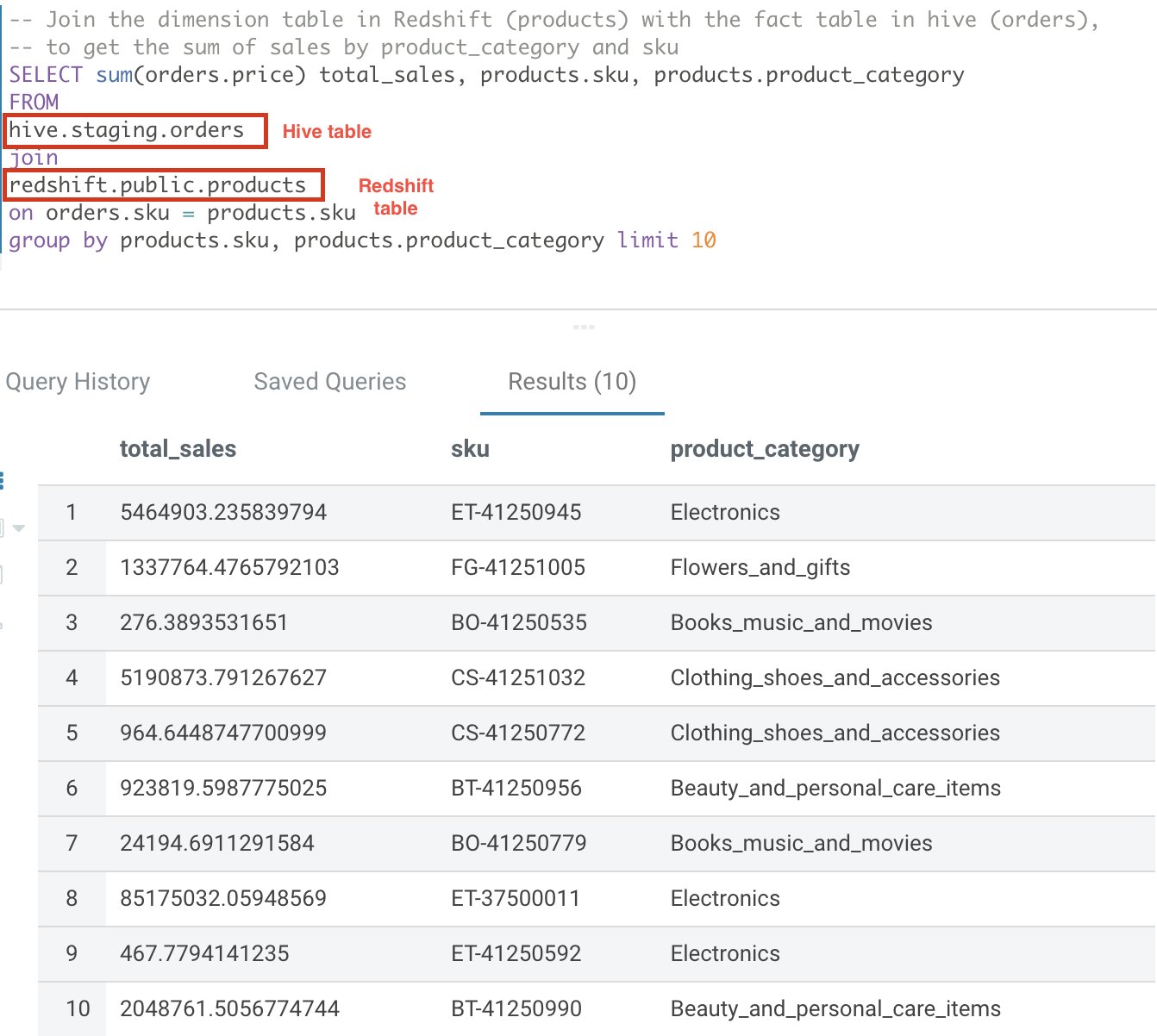
Now let’s use Trino to join both datasets:
-- Join the dimension table in Redshift (products) with the fact table in hive (orders),
to get the sum of sales by product_category and sku
SELECT sum(orders.price) total_sales, products.sku, products.product_category
FROM hive.staging.orders join redshift.public.products on orders.sku = products.sku
group by products.sku, products.product_category limit 10
The following screenshot shows our results.
Row filtering and column masking
Apache Ranger supports policies to allow or deny access based on several attributes, including user, group, and predefined roles, as well as dynamic attributes like IP address and time of access. In addition, the model supports authorization based on the classification of the resources such as like PII, FINANCE, and SENSITIVE.
Another feature is the ability to allow users to access only a subset of rows in a table or restrict users to access only masked or redacted values of sensitive data. Examples of this include the ability to restrict users to access only records of customers located in the same country where the user works, or allow a user who is doctor to see only records of patients that are associated with that doctor.
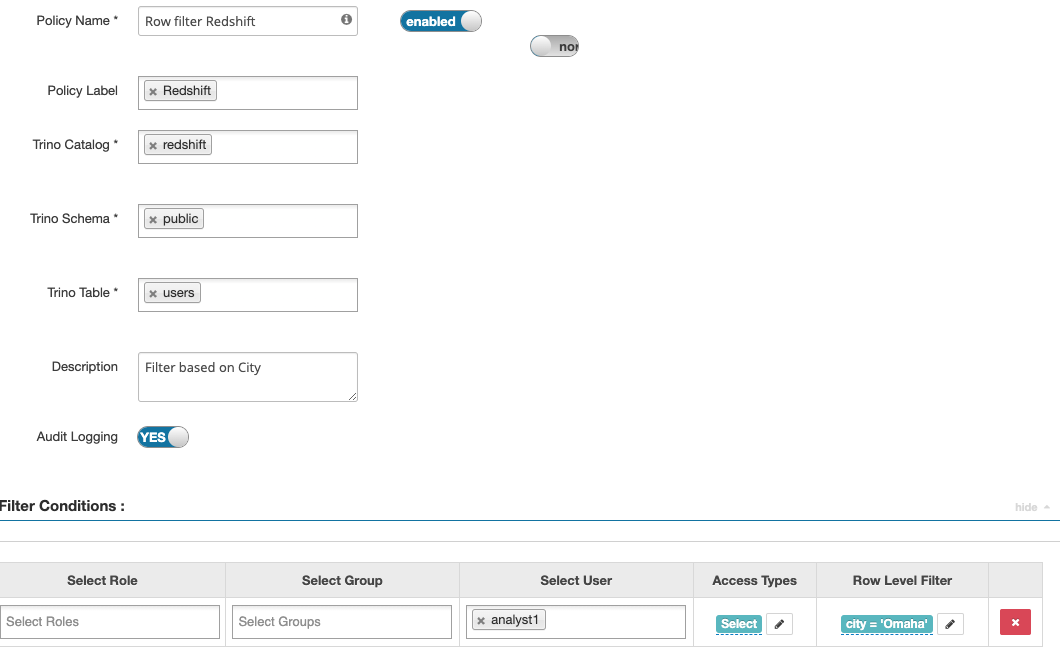
The following screenshots show how, by using Trino Ranger policies, you can enable row filtering and column masking of data in Amazon Redshift tables.
The example policy masks the firstname column, and applies a filter condition on the city column to restrict users to view rows for a specific city only.

The following screenshot shows our results.

Dynamic row filtering using user session context
The Trino Ranger plugin passes down Trino session data like current_user() that you can use in the policy definition. This can vastly simplify your row filter conditions by removing the need for hardcoded values and using a mapping lookup. For more details on dynamic row filtering, refer to Row-level filtering and column-masking using Apache Ranger policies in Apache Hive.
Known issue with Amazon EMR 6.7
Amazon EMR 6.7 has a known issue when enabling Kerberos 1-way trust with Microsoft windows AD. Please run this bootstrap script following these instructions as part of the cluster launch.
Limitations
When using this solution, keep in mind the following limitations, further details can be found here:
- Non-Kerberos clusters are not supported.
- Audit logs are not visible on the Apache Ranger UI, because these are sent to CloudWatch.
- The AWS Glue Data Catalog isn’t supported as the Apache Hive Metastore.
- The integration between Amazon EMR and Apache Ranger limits the available applications. For a full list, refer to Application support and limitations.
Troubleshooting
If you can’t log in to the EMR cluster’s node as an AD user, and you get the error message Permission denied, please try again.

This can happen if the SSSD service has stopped on the node you are trying to access. To fix this, connect to the node using the configured SSH key-pair or by making use of Session Manager and run the following command.
sudo service sssd restartIf you’re unable to download policies from Ranger admin server, and you get the error message Error getting policies with the HTTP status code 400. This can be caused because either the certificate has expired or the Ranger policy definition is not set up correctly.
To fix this, check the Ranger admin logs. If it shows the following error, it’s likely that the certificates have expired.
VXResponse@347f4bdbstatusCode={1} msgDesc={Unauthorized access - unable to get client certificate} messageList={[VXMessage={org.apache.ran
ger.view.VXMessage@7ebc298cname={OPER_NOT_ALLOWED_FOR_ENTITY} rbKey={xa.error.oper_not_allowed_for_state} message={Operation not allowed for entity} objectId={n
ull} fieldName={null} }]} }
You will need to perform the following steps to address the issue
- Recreate the certs using the create-tls-certs.sh script and upload them to Secrets Manager.
- Then update the Ranger admin server configuration with new certificate, and restart Ranger admin service.
- Create a new EMR security configuration using the new certificate, and re-launch EMR cluster using new security configurations.
The issue can also be caused due to a misconfigured Ranger policy definition. The Ranger admin service policy definition should trust the self-signed certificate chain. Make sure the following configuration attribute for the service definitions has the correct domain name or pattern to match the domain name used for your EMR cluster nodes.
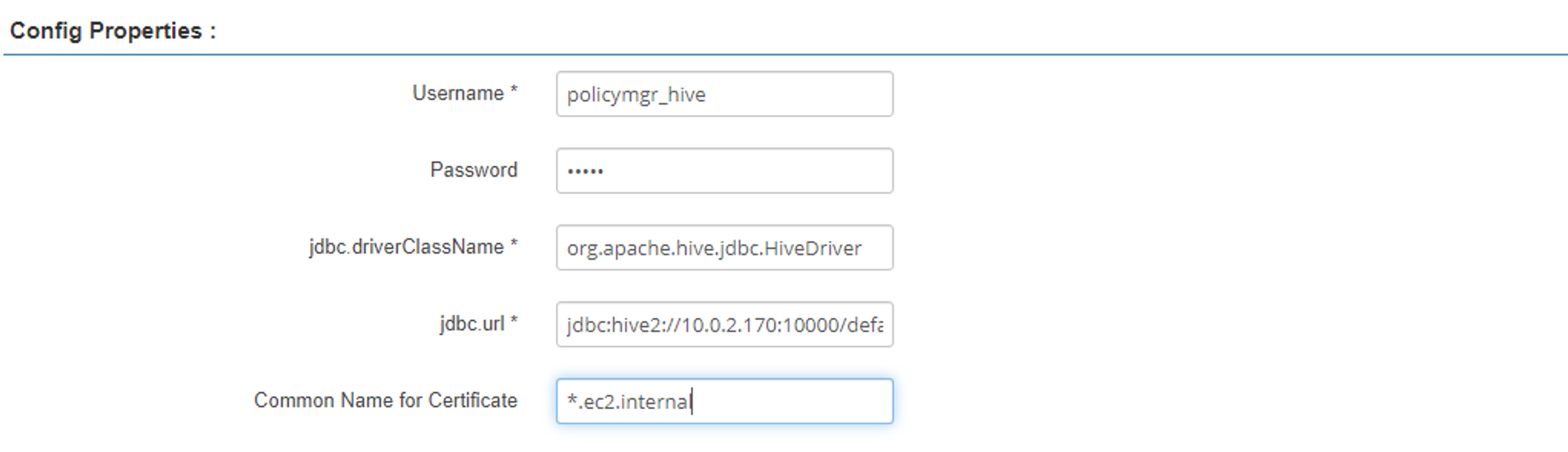
If the EMR cluster keeps failing with the error message Terminated with errors: An internal error occurred, check the Amazon EMR primary node secret agent logs.

If it shows the following message, the cluster is failing because the specified CloudWatch log group doesn’t exist:
Exception in thread "main" com.amazonaws.services.logs.model.ResourceNotFoundException: The specified log group does not exist. (Service: AWSLogs; Status Code: 400; Error Code: ResourceNotFoundException; Request ID: d9fa2ef1-17cb-4b8f-a07f-8a6aea245173; Proxy: null)
    at com.amazonaws.http.AmazonHttpClient$RequestExecutor.handleErrorResponse(AmazonHttpClient.java:1862)
    at com.amazonaws.http.AmazonHttpClient$RequestExecutor.handleServiceErrorResponse(AmazonHttpClient.java:1415)
    at com.amazonaws.http.AmazonHttpClient$RequestExecutor.executeOneRequest(AmazonHttpClient.java:1384)
A query run through trino-cli might fail with the error Unable to obtain password from user. For example:
ERROR   remote-task-callback-42 io.trino.execution.StageStateMachine    Stage 20220422_023236_00005_zn4vb.1 failed
com.google.common.util.concurrent.UncheckedExecutionException: com.google.common.util.concurrent.UncheckedExecutionException: java.lang.RuntimeException: javax.security.auth.login.LoginException: Unable to obtain password from user
This issue can occur due to incorrect realm names in the etc/trino/conf.dist/catalog/hive.properties file. Check the domain or realm name and other Kerberos related configs in the etc/trino/conf.dist/catalog/hive.properties file. Optionally, also check the /etc/trino/conf.dist/trino-env.sh and /etc/trino/conf.dist/config.properties files in case any config changes has been made.
Clean up
Clean up the resources created either manually or by the AWS CloudFormation template provided in GitHub repo to avoid unnecessary cost to your AWS account. You can delete the CloudFormation stack by selecting the stack on the AWS CloudFormation console and choosing Delete. This action deletes all the resources it provisioned. If you manually updated a template-provisioned resource, you may encounter some issues during cleanup; you need to clean these up independently.
Conclusion
A data mesh approach encourages the idea of data domains where each domain team owns their data and is responsible for data quality and accuracy. This draws parallels with a microservices architecture. Building federated data governance like we show in this post is at the core of implementing a data mesh architecture. Combining the powerful query federation capabilities of Apache Trino with the centralized authorization and audit capabilities of Apache Ranger provides an end-to-end solution to operate and govern a data mesh platform.
In addition to the already available Ranger integrations capabilities for Apache SparkSQL, Amazon S3, and Apache Hive, starting from 6.7 release, Amazon EMR includes plugins for Ranger Trino integrations. For more information, refer to EMR Trino Ranger plugin.
About the authors
Varun Rao Bhamidimarri is a Sr Manager, AWS Analytics Specialist Solutions Architect team. His focus is helping customers with adoption of cloud-enabled analytics solutions to meet their business requirements. Outside of work, he loves spending time with his wife and two kids, stay healthy, mediate and recently picked up gardening during the lockdown.
Partha Sarathi Sahoo is an Analytics Specialist TAM – at AWS based in Sydney, Australia. He brings 15+ years of technology expertise and helps Enterprise customers optimize Analytics workloads. He has extensively worked on both on-premise and cloud Bigdata workloads along with various ETL platform in his previous roles. He also actively works on conducting proactive operational reviews around the Analytics services like Amazon EMR, Redshift, and OpenSearch.
Anis Harfouche is a Data Architect at AWS Professional Services. He helps customers achieving their business outcomes by designing, building and deploying data solutions based on AWS services.
Enjoyed this article? Sign up for our newsletter to receive regular insights and stay connected.