
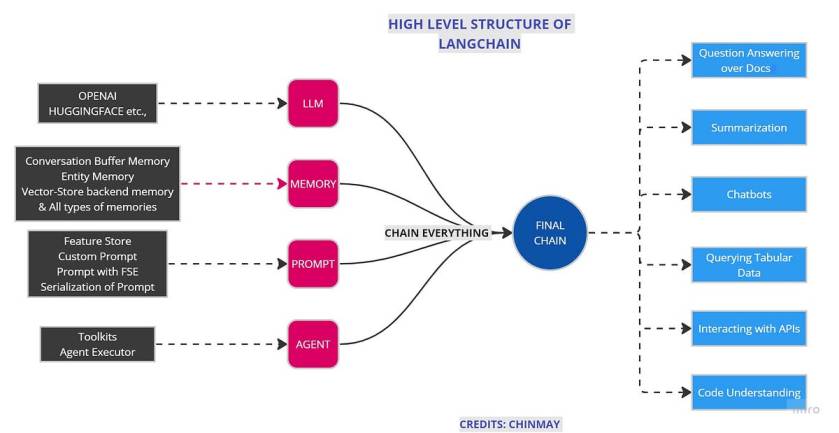
The creation of LLM applications with the help of LangChain helps us to Chain everything easily.LangChain is an innovative framework that is revolutionizing the way we develop applications powered by language models. By incorporating advanced principles, LangChain is redefining the limits of what can be achieved through traditional APIs.
In the last blog, we discussed modules present in LangChain in detail, revising it,
Langchain constist of few modules. As its name suggests, CHAINING different modules together are the main purpose of Langchain. We discussed this module.
- Model
- Prompt
- Memory
- Chain
- Agents
In this blog, we will see the actual applications of LangChain and its different use cases.
Let’s build simple applications with LangChain without any further due. The most interesting application is creating a question-answering bot over your own custom data.
Code
Disclaimer/Warning: This code is just to show how applications are built. I didn’t claim any optimization in the code and further improvements are needed according to the specific problem statement.
Let’s start with imports
Importing LangChain and OpenAI for LLM part. If you do not have any of this then please install it.
#    IMPORTS
from langchain.embeddings.openai import OpenAIEmbeddings
from langchain.vectorstores import Chroma
from langchain.text_splitter import CharacterTextSplitter
from langchain.chains import ConversationalRetrievalChain
from langchain.vectorstores import ElasticVectorSearch, Pinecone, Weaviate, FAISS
from PyPDF2 import PdfReader
from langchain import OpenAI, VectorDBQA
from langchain.vectorstores import Chroma
from langchain.prompts import PromptTemplate
from langchain.chains import ConversationChain

from langchain.document_loaders import TextLoader
# from langchain import ConversationalRetrievalChain
from langchain.chains.question_answering import load_qa_chain
from langchain import LLMChain
# from langchain import retrievers
import langchain
from langchain.chains.conversation.memory import ConversationBufferMemory
py2PDF is used to read and process pdf. Also, there are different types of memories like ConversationBufferMemory, ConversationBufferWindowMemorythat have specific functions to perform. I am writing the next blog of this series dedicated to memories so I will elaborate everything over there.
Let’s set the environment.
I guess you know how you can get the OpenAI API key. but just in case,
- Go to the OpenAI API page,
- Click on Create new secrete key
- That will be your API key. Paste it below
import os
os.environ["OPENAI_API_KEY"] = "sk-YOUR API KEY"
Which model to use? Davinci, Babbage, Curie, or Ada? GPT 3 based? GPT 3.5-based or GPT 4-based? There are lots of questions about models and all models are good for different tasks. few are cheap and few are more accurate. We also going to see all models in detail in 4th blog of this series.
For simplicity, we will use most cheaper model “gpt-3.5-turbo”. The temperature is a parameter that gives us an idea about the randomness of the answer. More the value of temperature, the more random answers we will get.
llm = ChatOpenAI(temperature=0,model_name="gpt-3.5-turbo")
Here you can add your own data. You can add in any format like PDF, Text, Doc, CSV. According to your data format, you can comment/uncomment the following code.
# Custom data
from langchain.document_loaders import DirectoryLoader
pdf_loader = PdfReader(r'Your PDF location')

# excel_loader = DirectoryLoader('./Reports/', glob="**/*.txt")
# word_loader = DirectoryLoader('./Reports/', glob="**/*.docx")
We cant add all data at once. We split data into chunks and send it to create embeddings for data. If you don’t know what embeddings are then
Embeddings, in the form of numerical vectors or arrays, capture the essence and contextual information of the tokens manipulated and produced by the model. These embeddings are derived from the model’s parameters or weights and serve the purpose of encoding and decoding the input and output texts.
Enjoyed this article? Sign up for our newsletter to receive regular insights and stay connected.