
The main architectural decision is where the storage dependency lives. On EKS with Outposts, EBS keeps the I/O path local to the rack, while EFS introduces a hard dependency on connectivity to the parent Region, and S3 on Outposts requires API-level integration rather than traditional block or file semantics. That means the same Kubernetes storage abstraction can hide very different failure domains, latency profiles, and operational overhead.
For platform teams, the practical challenge is matching workload behavior to storage semantics. Stateful services that need predictable latency and single-writer block access map differently from collaborative applications that need shared POSIX files or object-oriented workflows that consume S3 APIs. Choosing the wrong storage layer can create avoidable bottlenecks, especially when workloads mix metadata-heavy access, bursty writes, and replica rescheduling across constrained on-premises capacity.
Outposts also changes how you think about resilience and lifecycle management. Local storage reduces dependence on the WAN, but it narrows the blast radius to finite rack capacity and, for EBS, the availability characteristics of the Outpost itself. That makes snapshot strategy, backup frequency, and capacity forecasting part of the deployment design rather than after-the-fact operations. For EFS and S3, service-link health becomes an application dependency that should be reflected in runbooks and recovery testing.
Observability is not optional in this model. Teams need to watch storage-specific metrics alongside Kubernetes scheduling and node health to understand whether latency comes from the application, the volume, the network path, or exhausted capacity. In practice, the best outcome comes from aligning storage class, access pattern, encryption, and monitoring from the start so that hybrid deployments remain portable without hiding platform-specific constraints.
Amazon EKS on Outposts deployment options
The following two sections outline the differences between Amazon EKS extended and local cluster deployment options available on Outposts.Amazon EKS extended cluster architecture
Amazon EKS extended clusters on Outposts provide a powerful solution for organizations seeking to use the benefits of Kubernetes while maintaining certain workloads on-premises, as shown in the following figure. This hybrid architecture allows businesses to extend their EKS clusters from the AWS Cloud to their own data centers or edge locations using Outposts. The Kubernetes control plane remains in the AWS Region, providing centralized management and benefiting from the AWS infrastructure in the cloud and on the Outpost. Outposts is designed to be a connected service, and needs reliable network connectivity to the AWS Region using the Outposts service link.Amazon EKS local cluster architecture
Amazon EKS local clusters deploy the Kubernetes control plane on your Outpost, as shown in the following figure. This provides greater network resilience against outages as cluster operations run entirely on the Outposts and reduces the dependency on network connectivity to the AWS Region. Having the Kubernetes control plane hosted on your Outpost also reduces latency for cluster operations.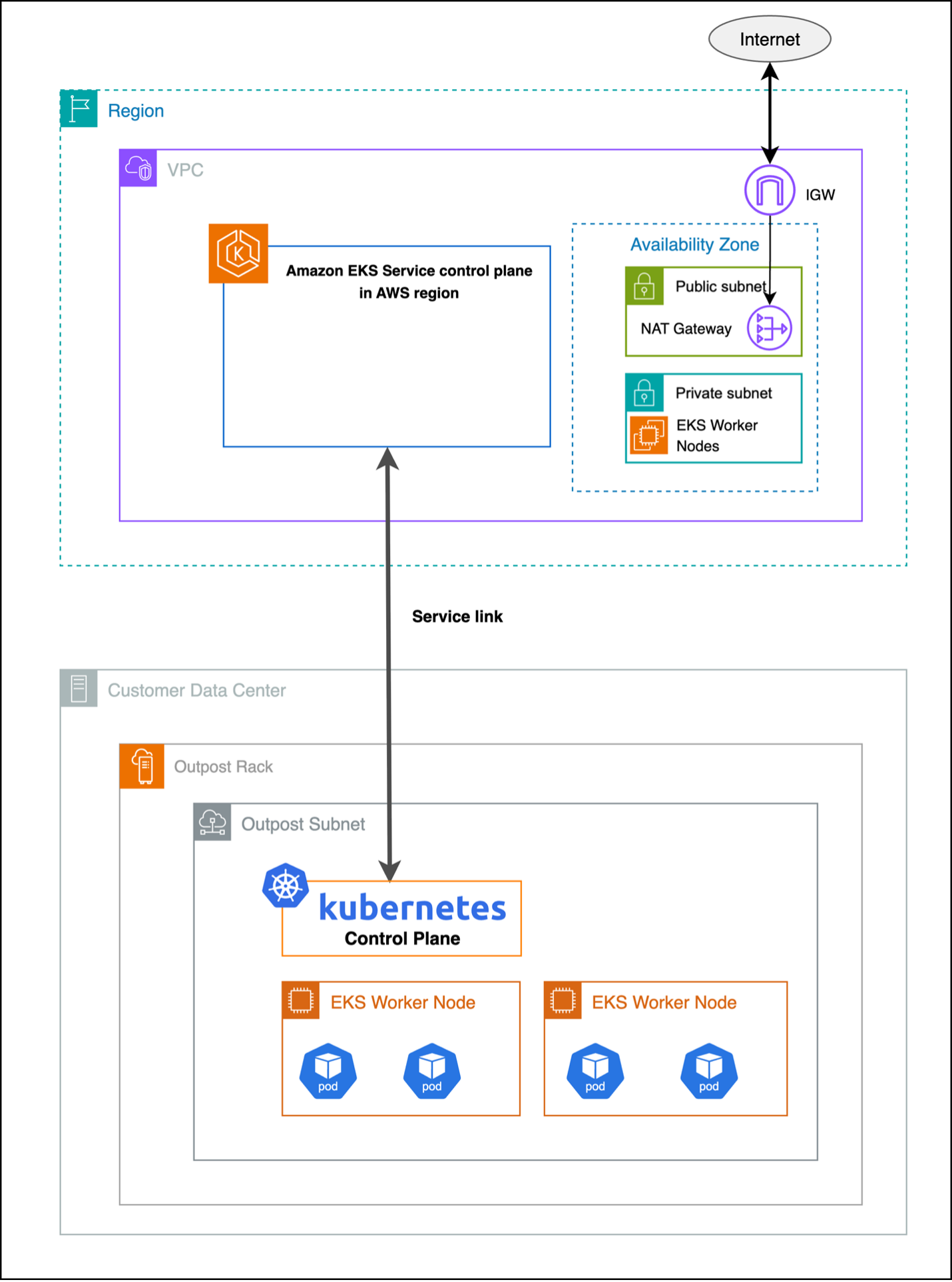 Figure 2: Local cluster
Storage options for Amazon EKS extended clusters on Outposts
Persistent Volumes (PV) and Persistent Volume Claims (PVC) serve as a critical abstraction layer in Kubernetes, separating the storage consumption details from storage provisioning, and allowing administrators to manage storage resources independently from how applications consume them. PVs and PVCs make sure of data persistence across pod restarts and rescheduling events, making them essential for applications that need to maintain state, such as databases, file storage systems, and other data-intensive workloads. The abstraction provided by PV and PVC enables platform-agnostic storage management, where applications can request storage through PVCs without needing to know the underlying storage implementation details. PVs and PVCs support dynamic provisioning through Storage Classes, allowing for automated storage allocation based on application demands, while also providing features such as access modes, capacity management, and reclaim policies to effectively manage the storage lifecycle in a Kubernetes cluster.Integrating Amazon EBS with Amazon EKS
Amazon Elastic Block Store (Amazon EBS) provides high-performance block storage that’s ideal for low-latency applications providing consistent performance. When deployed on Outposts racks, EBS volumes are stored on the Outposts hardware, providing significant performance advantages over network-attached storage solutions, as shown in the following figure.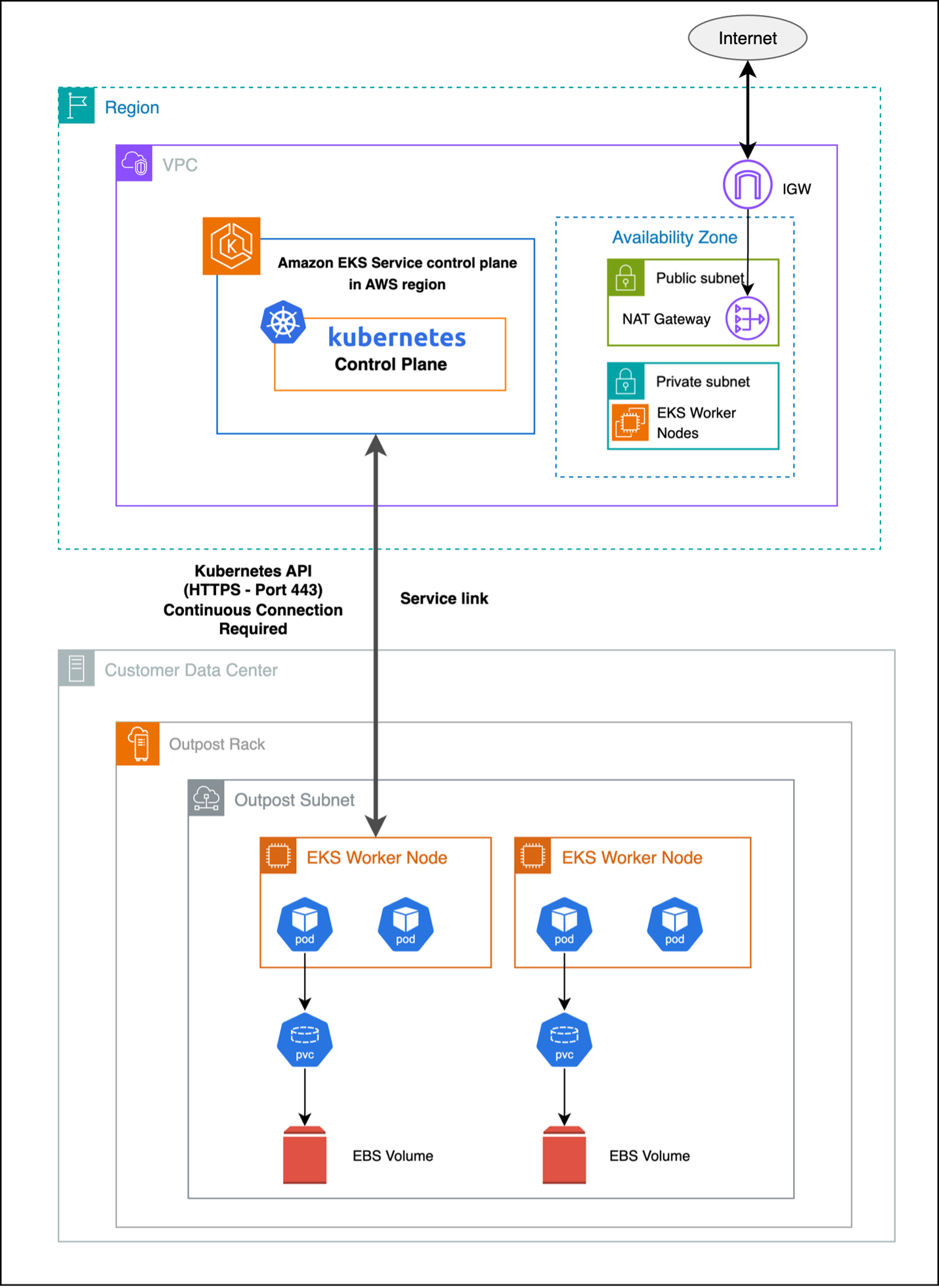 Figure 3 : Integrating Amazon EBS with Amazon EKS on Outposts
Benefits and use cases
- Storage: EBS volumes on Outposts racks provide data access without dependency on external connectivity.
- Performance: Local storage delivers consistent latency and high IOPS/throughput.
- Cost: On-premises storage eliminates data transfer costs and reduces bandwidth needs, lowering the total cost of ownership.
Implementation considerations
Consider the following when using EBS on Outposts rack:- EBS volumes on Outposts are tied to a single rack and the availability zone the Outpost is homed to, needing applications to address single-point-of-failure risks.
- Protect data using EBS snapshots in the parent Region and schedule regular backups.
- Capacity on Outposts is finite, monitor Outposts storage usage and plan expansions proactively to avoid insufficient capacity errors.
Amazon EFS with Amazon EKS
Amazon Elastic File System (Amazon EFS) provides scalable, shared file storage that can be accessed across multiple AWS Availability Zones (AZs) and on-premises environments. Although Amazon EFS with Amazon EKS on Outposts maintains the same setup procedures as standard cloud deployments, there is a critical dependency on the service link connection between your Outposts and the AWS Region. Amazon EFS is not a locally supported service on Outposts, so connectivity to the AWS Region is required to use this service with your Outpost. Amazon EFS allows multiple pods to concurrently access shared file systems. It is well-suited for applications that need collaborative data access, content management, and distributed processing workloads.Amazon EFS as a persistent storage solution for Amazon EKS extended cluster instances
Amazon EFS as a PV for your Amazon EKS extended cluster operates through a hybrid architecture where the Amazon EFS file system resides in the Region, but mount points can be created on the worker nodes running on Outposts subnets through the service link as shown in the following figure.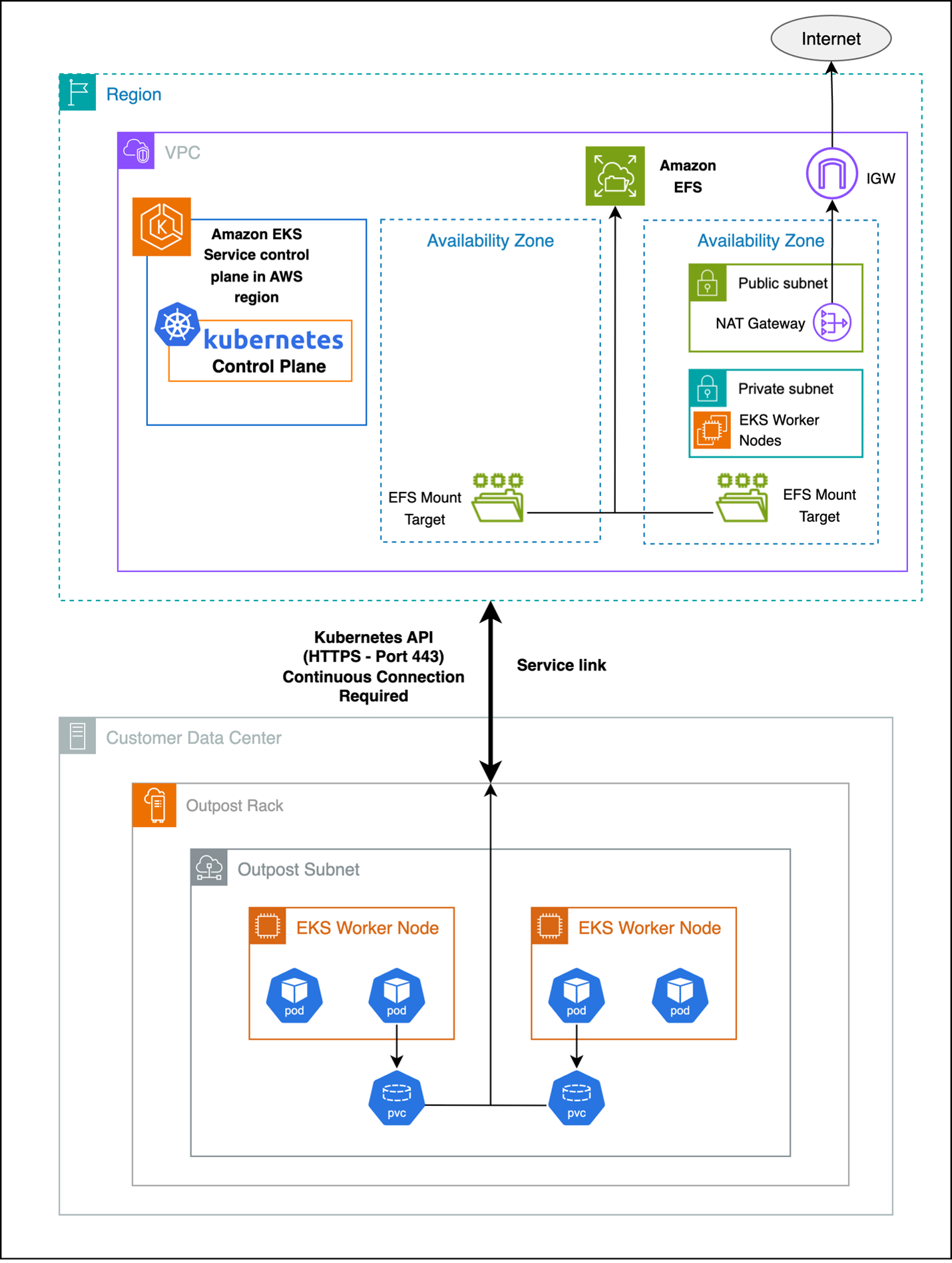 Figure 4 : Amazon EFS as a persistent storage solution for extended clusters
Benefits and use cases
- Shared storage capabilities: multiple pods can access a centralized file system, enabling shared data, code, and assets across instances.
- Scalability: storage capacity and performance automatically scale with usage, eliminating manual provisioning and upfront planning.
- Compliance: Amazon EFS provides full file system features and compatibility for traditional applications, such as locking, permissions, and directory structure.
Challenges and limitations
Consider the following when using Amazon EFS with Outposts:- Network latency: file access involves network traversal to Amazon EFS in the Region, adding more latency and making small or metadata operations potentially slow for latency-sensitive applications.
- Throughput: aggregate throughput is restricted by the available bandwidth on the service link between the Outposts and AWS Region. This impacts concurrent access and large file transfers during peak usage.
- Dependency on AWS Region connectivity: Amazon EFS needs continuous connectivity to the parent Region. Disruptions may affect file system availability, operations, and disaster recovery processes.
- Data Transfer charges: Since EFS is in AWS Parent region and EKS worker nodes and pods are in Outpost additional charges are applicable.
Deploying pods on extended clusters using Amazon EFS as PV
Refer to Use Elastic File System Storage with Amazon EFS for deployment guidance. Note, Create Amazon EFS mount targets in subnets that are in the same Availability Zone (AZ) as the Outposts subnets.Amazon S3 with Amazon EKS extended cluster
Amazon Simple Storage Service (Amazon S3) on Outposts delivers local object storage on your Outposts, allowing applications to use Amazon S3 APIs for storing and retrieving data while keeping it onsite. It is ideal for workloads that need Amazon S3 compatibility, low latency access to object data, and local data residency. You should use Amazon S3 access point Amazon Resource Names (ARNs) and not bucket ARNs for proper integration with Amazon EKS workloads. Learn more about Amazon S3 on Outposts.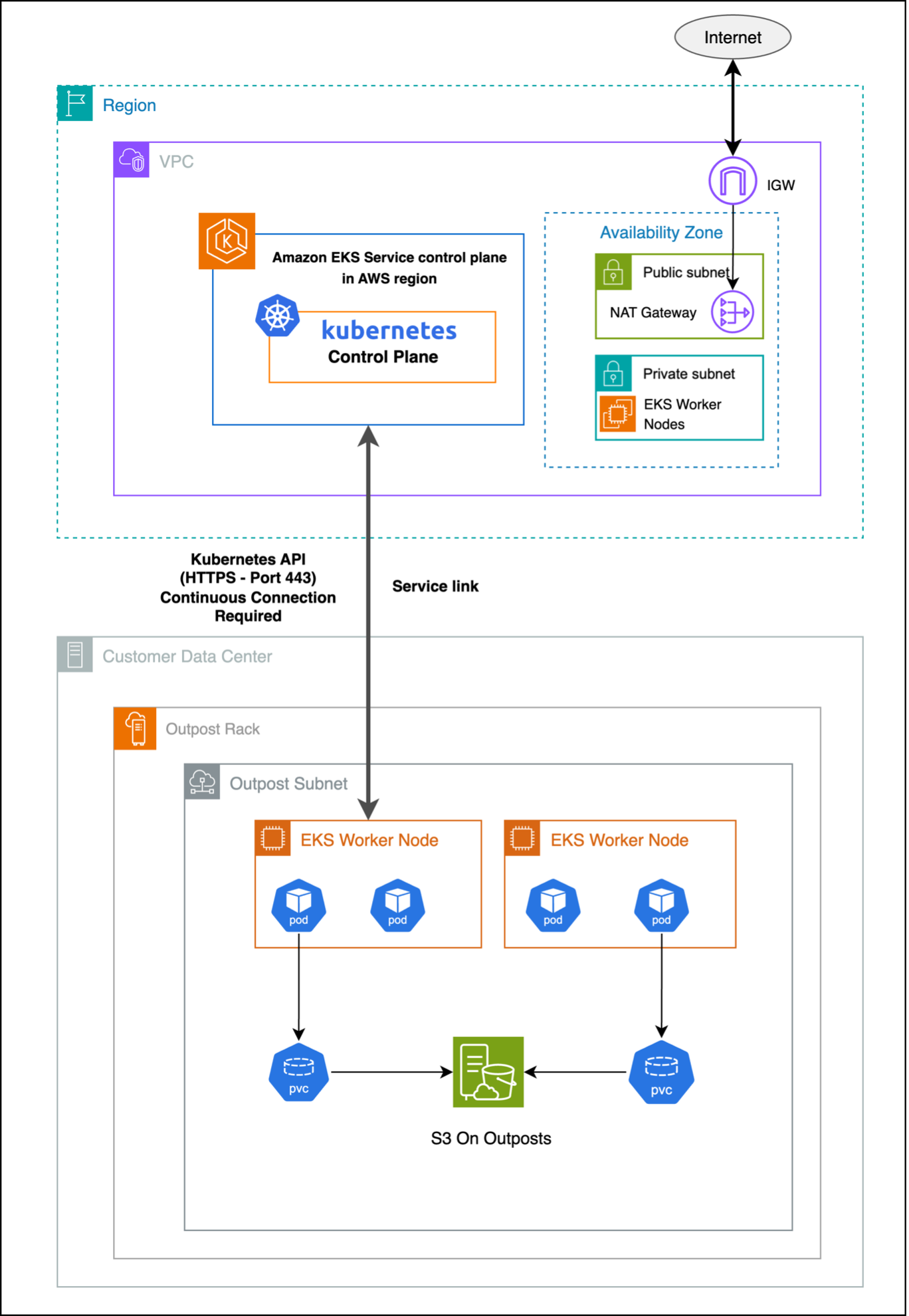 Figure 5 : Amazon S3 with Amazon EKS extended cluster on Outposts
Benefits and use cases
- Data archiving and compliance: Enables cost-effective, locally retained storage for logs, audit trails, regulatory compliance, backups, and sensitive healthcare data with strict residency requirements.
- Content distribution and media: Provides ultra-low latency local storage for serving static content, media streaming, digital asset management, and gaming asset delivery.
- Data lake and analytics: Supports local data processing for analytics, ETL, machine learning (ML), real-time Internet of Things (IoT) data handling, and business intelligence with reduced latency and transfer costs.
- Application integration: Seamlessly integrates with Amazon S3 compatible apps for backup, synchronization, microservices storage, API-driven workflows, and container image management on-premises.
Deploying pods on extended clusters using Amazon S3 as PV
Step 1: Create Amazon S3 on Outposts bucketStep 2: Create Amazon S3 Access Point (necessary for Amazon EKS integration)
Step 3: Configure IAM roles and policies
Step 4: Install Amazon S3 CSI driver
Step 5: Deploying your pod with Amazon S3 volume attached
Step 6: Complete Amazon S3 configuration with Kubernetes Refer to the documentation Static Provisioning on Outposts bucket for more details on Step 5.
Best practices for optimizing performance
Optimizing performance starts with selecting the right storage type for your workload: Amazon EBS for low-latency, high-throughput block storage; Amazon EFS for shared POSIX-compliant file systems; and Amazon S3 for scalable object storage with API compatibility. Ensure proper volume sizing, monitor usage proactively, and configure CPU and memory requests accurately to balance performance and efficiency—auto scaling and QoS classes can further optimize resource management. Improve data locality by using local storage, apply caching with intelligent eviction, and design for efficient, asynchronous, and compressed data access patterns.Monitoring and observability
Monitoring key performance metrics is essential to maintain storage efficiency and application reliability. For Amazon EBS, track IOPS, throughput, latency, burst balance, queue depth, and snapshot performance to avoid degradation—see the Amazon CloudWatch metrics for Amazon EBS for the full list. For Amazon EFS, monitor total I/O, throughput, client connections, metadata operations, burst credits, and Regional data transfers to support effective capacity planning—refer to CloudWatch metrics for Amazon EFS. For Amazon S3, observe request and error rates, data transfer, storage usage, latency, multipart upload efficiency, and access patterns to optimize performance and cost—see Metrics and dimensions.Security considerations
Strong security practices are critical for Amazon EKS on Outposts. Use AWS Key Management Service (AWS KMS) for Amazon EBS encryption, encrypt Amazon EFS data at rest and in transit, and enable server- or client-side encryption for Amazon S3. Enforce TLS for all data transfers and apply key rotation with compliance controls. Implement least privilege IAM policies, scoped roles, and Kubernetes Role-Based Access Control (RBAC) for granular pod access. Secure traffic with security groups and NACLs, and maintain audit logs for all storage operations.Cost optimization strategies
Manage storage costs by right-sizing volumes, automating lifecycle policies, selecting appropriate storage classes, monitoring data transfer, and using de-duplication and compression where applicable. Lower operational expenses through automated backups, infrastructure as code (IaC), monitoring automation, leveraging managed services, applying cost allocation tags, and conducting regular usage reviews.Conclusion
Amazon EKS on Outposts empowers organizations to build hybrid applications with storage options that align to performance, compliance, and data residency needs. By selecting the right storage solution for each workload and leveraging Outposts’ local infrastructure, you can reduce latency, minimize network dependencies, and maintain consistency across environments. As Outposts capabilities continue to evolve, they offer a strong foundation for modern, resilient, and cost-efficient hybrid cloud architectures. Reach out to your AWS account team, or fill out this form to learn more about running containarized applications on Outposts.Enjoyed this article? Sign up for our newsletter to receive regular insights and stay connected.