
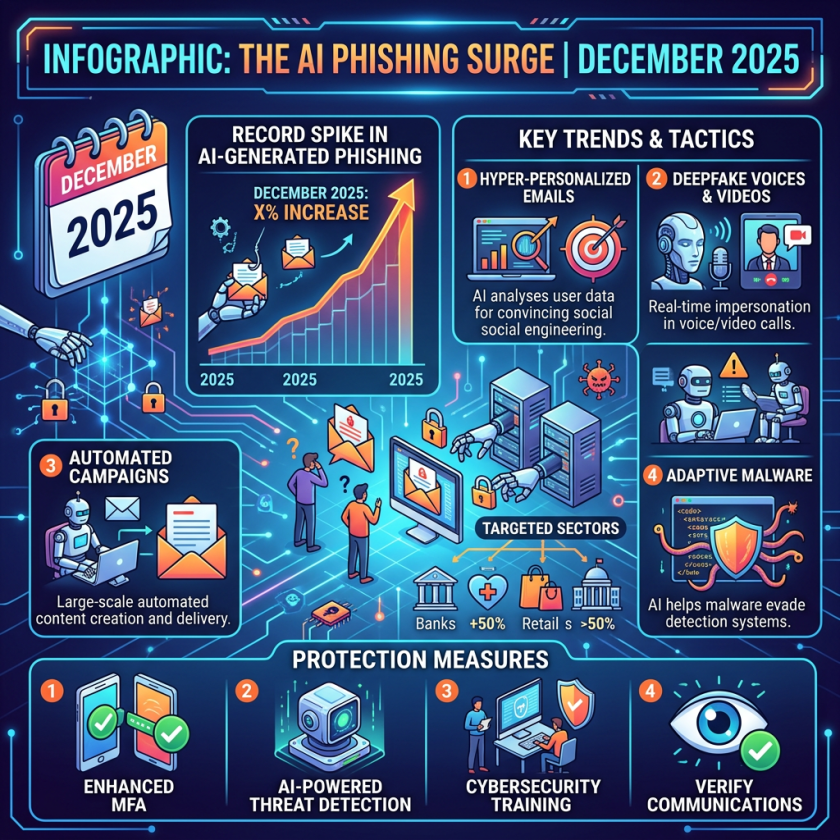
For IT teams, the important shift is not just that phishing looks better; it is that the delivery channel, authentication layer, and session layer are now being attacked together. Smishing, QR-based lures, and voice-clone fraud all exploit different user behaviors, but they increasingly land on the same technical choke points: identity verification, session management, and fraud detection workflows. That means security teams need to think beyond message filtering and user training toward controls that break the attacker’s chain earlier.
One practical implication is that MFA policy should be evaluated by attack class, not as a universal shield. Standard one-time codes still help against password reuse and credential stuffing, but they do not neutralize adversary-in-the-middle techniques that proxy the login and steal the resulting session cookie. For architects, that makes phishing-resistant authentication, session binding, and device-aware access policies more relevant than adding yet another code prompt.
Operationally, the fraud problem also crosses team boundaries. Security operations, help desk, IAM, and finance workflows all need a shared response path for suspicious links, unexpected payment requests, and voice-based approvals. If those teams act independently, the business absorbs delay, duplicated verification, and inconsistent escalation. If they share a single verification playbook, they can reduce both user friction and the chance that a convincing lure reaches a privileged action.
For engineering leaders, the broader lesson is about control points: prefer direct navigation over embedded links, use authenticators or hardware keys for high-value accounts, and design approval flows so that a spoken request or scan alone cannot authorize a transaction. The most resilient posture is to assume the lure will succeed at the attention layer and make sure it still fails at the identity and transaction layer.
For most of 2025, AI-generated scams were still a minority of what hit inboxes and phones — a growing threat, but not yet the dominant one. Then December arrived. According to Hoxhunt’s 2026 Phishing Trends Report, AI-assisted attacks surged from 4% of all reported phishing in November 2025 to 56% in December, a 14-fold jump in a single month driven by criminal actors using generative AI to mass-produce convincing lures at zero skill cost. That share had stabilized at around 40% through early 2026 and, as of this Independence Day weekend, has held there — meaning four in ten phishing attempts a reader encounters today are AI-generated. The Federal Trade Commission confirmed the human cost: imposter scams — the category that includes smishing, voice cloning, and QR-code fraud — were the most reported type of fraud in 2025 for the ninth consecutive year, with losses climbing nearly 20% to $3.5 billion.
The mechanism driving that cost is no longer just convincing language. Google’s June 2026 Fraud and Scams Advisory documented a new attack class that security researchers call adversary-in-the-middle, or AITM: rather than stealing your password, these attacks let you authenticate completely — including your multi-factor authentication step — and then steal the session cookie your browser receives as proof of successful login. The attacker imports that cookie and is instantly logged in as you, with no password and no MFA challenge. The implication for every reader who considers MFA their last line of defense is direct: it is necessary but no longer sufficient. Understanding this, and the three dominant scam vectors now running on AI infrastructure, is the most valuable security decision a reader can make this summer.
Smishing Text Scams: Fake Urgency at Scale
Smishing — phishing delivered by SMS — became the dominant way malicious links reached phones in 2025 and has not slowed in 2026. The reason texts outperform email for this purpose is psychological and structural: an SMS from what appears to be a bank, a carrier, or a delivery service arrives in a thread alongside messages from real contacts, carries more implicit authority than a promotional email, and is read on a small screen where inspecting a URL before tapping is difficult or impossible.
The scale problem became concrete on June 12, 2026, when Google filed a civil RICO lawsuit in Manhattan federal court against a China-based cybercrime network it calls the “Outsider Enterprise.” According to court documents, the operation sold subscription access to a phishing-as-a-service platform for as little as $88 per week, giving paying operators immediate access to more than 290 ready-made website templates impersonating financial institutions, wireless carriers, government agencies, and toll services. The platform was linked to more than 1.59 million fraudulent URLs and 9,000 fake websites between November 2025 and April 2026. Over a two-week period in May 2026 alone, Android users flagged 55,000 spam texts tied to the campaign, and the network sent approximately 2.5 million messages to Android devices. The FBI has connected the operation to an estimated 3.87 million stolen credit cards and $1.9 billion in losses since July 2023.
What made Outsider Enterprise technically significant — and what Google’s lawsuit documented with screenshots — is the role of AI in lowering the barrier to entry. Members prompted Google’s Gemini to generate HTML code for “gift redemption” pages, describing the request as an innocuous programming task. The AI had no way to identify the fraudulent intent; it generated clean, functional code that operators then loaded into the phishing platform. The result was an assembly line: a criminal with no coding background could generate a convincing, mobile-optimized fake bank login page on demand, deploy it under a fresh domain, and send it to thousands of targets before any spam filter had seen the URL. That is the mechanism that has turned smishing from a craft into an industrial process.
How to protect yourself from smishing: Do not tap links in unexpected texts regardless of how official they look. If a message claims to be from your bank, the postal service, or a toll agency, navigate directly to the official website in your browser or call the number printed on the back of your card. Forward suspicious texts to 7726 (SPAM) — a carrier-shared reporting number that feeds into law enforcement and carrier fraud teams.
QR Code Phishing: Physical and Digital Attacks Converge
“Quishing” — QR-code phishing — exploits a design feature of QR codes that no amount of consumer vigilance fully solves: your phone’s camera reads the code and resolves the URL before you can see where it leads. Unlike an email link that at least displays a domain on hover, a QR code shows nothing until the redirect is already in progress.
Google’s June 2026 advisory specifically flagged AITM-enabled quishing attacks that mirror legitimate login flows — including the MFA challenge — to capture both the user’s password and the active session cookie simultaneously. When attackers embed a malicious QR code in what appears to be a company calendar invite, a parking meter sticker, or a phishing email, victims who scan with a personal phone bypass any desktop email security tools entirely and land on a credential-harvesting page built for mobile screens.
The physical-world variant is worth calling out separately. Stickers placed over legitimate QR codes on parking meters, restaurant menus, and event check-in stands have been documented in multiple U.S. cities. A consumer who scans what they believe is a parking payment code and sees a plausible-looking “payment portal” has no technical cue that anything is wrong — the layout is professional, the branding is close, and the urgency of a time-limited parking spot does the rest.
How to protect yourself from quishing: Use a QR scanner app that displays the full destination URL before opening it and that allows you to cancel before the page loads. Treat physical QR codes with the same skepticism as email links — if a sticker appears to have been placed over an existing code, treat it as suspect. Never scan a QR code from an unexpected email using a personal phone; navigate directly to the service instead.
Voice Cloning Scams: Three Seconds of Audio Is All It Takes
Of the three dominant AI scam vectors, voice cloning may produce the most immediate financial harm because it defeats the one verification tool most people trust without thinking: recognizing a familiar voice. According to McAfee’s research, as little as three seconds of audio — the length of a voicemail greeting, a social media clip, or a podcast appearance — is sufficient to generate a synthetic voice clone with approximately 85% accuracy. One in ten adults globally reported receiving an AI-cloned voice message as of McAfee’s most recent survey, and of those who did, 77% lost money.
The grandparent scam — a panicked call from a voice that sounds like a child or grandchild, demanding immediate money — has been updated with this technology. A more dangerous variant has emerged in corporate settings. In 2024, a finance employee at engineering firm Arup wired $25 million across multiple transactions after a video call featuring a deepfaked version of the company’s CFO and several colleagues, all reconstructed from video footage of real staff members from prior online meetings. The employee had initially suspected the request was a phishing email; the live-seeming video call erased the concern. The money was not recovered.
The structural problem that makes voice cloning hard to defeat is not the technology itself — it is the trust hierarchy it exploits. A call from a voice that sounds exactly like your child activates instincts that exist specifically to override skepticism. No security training can fully override that reflex. The defenses that work are procedural, not perceptual: they bypass the voice entirely.
How to protect yourself from voice cloning: Establish a family code word — an arbitrary phrase agreed on in advance that only family members know — and use it to verify identity in any emergency phone call before taking any financial action. If you receive a distressing call from someone who sounds like a loved one, hang up and call them back on a number you already have stored. Never transfer money or purchase gift cards based solely on a phone call, regardless of how familiar the voice sounds. Legitimate law enforcement, courts, and hospitals never demand immediate payment through a phone call.
Why MFA Is No Longer a Complete Defense
For years, security advice converged on a clear message: enable multi-factor authentication on every account, and even if your password is stolen, attackers cannot get in. That advice remains correct for the majority of attacks — MFA still blocks credential-stuffing and most password-reuse attacks. But for the most sophisticated phishing campaigns now running at scale, MFA has a structural gap.
Adversary-in-the-middle attacks do not steal your password before you authenticate. They proxy the entire authentication process — your browser talks to the attacker’s server, which relays everything to the real website in real time. You see the real login page, because it is the real one, relayed through a proxy. You enter your credentials. The real website sends an MFA challenge. You complete it. The real website issues a session cookie confirming successful login. At that moment, the proxy captures the session cookie and sends it to the attacker. The attacker loads the cookie into their own browser and is logged in as you — with no further authentication required.
Google’s June 2026 advisory confirmed this attack class and identified the countermeasure it is developing: Device Bound Session Credentials, a mechanism that ties session cookies to specific hardware so that a stolen cookie cannot be replayed from another device. Until that standard is broadly deployed, the most effective consumer defense against AITM remains behavioral — specifically, not clicking the link that initiates the proxy chain in the first place.
What does protect against AITM is hardware-based, phishing-resistant authentication: physical security keys such as YubiKey that complete a cryptographic challenge unique to the specific device and website, making session hijacking structurally impossible. For most consumers without a hardware key, the relevant protection is simpler: treat the link itself as the threat, not just the page it leads to.
Your 2026 Scam-Defense Checklist
These behaviors make a reader a significantly harder target across all three attack vectors.
Go direct, not via link. Whether a text, email, or QR code is the delivery mechanism, navigate to the official website or app manually instead of following the provided path. Banks, postal services, toll agencies, and government entities all have official apps and websites. Using them directly is the single most effective defense against smishing, quishing, and credential-phishing simultaneously.
Use an authenticator app, not SMS, for multi-factor authentication. MFA remains essential and stops the vast majority of attacks. Prefer an authenticator app over text-based codes, since SIM-swapping attacks can intercept SMS codes. For high-value accounts — financial, email, work systems — a hardware security key provides the strongest available protection.
Establish a family code word before you need it. Agree on a private phrase with close family members that can verify identity on any emergency phone call. The code word is specifically designed to defeat voice cloning: no AI clone will know a phrase that was never spoken or written publicly. Use it if anyone calls sounding panicked and requesting money.
Preview QR codes before tapping. Use a QR scanner app that displays the full destination URL before opening it. If the domain does not match the brand or business associated with the code, do not proceed. In public settings, look for stickers placed over an original QR code.
Recognize urgency as a red flag, not a reason to act. Every major AI scam format — smishing, quishing, voice cloning — depends on creating a sense of emergency that bypasses rational judgment. If a message or call demands immediate action, that pressure is itself a warning sign. Pause. Verify through an independent channel. Then act.
Audit your public audio and video. Voice samples, photos, and personal details posted publicly on social media give scammers the raw material to clone your identity or craft personalized lures. Review privacy settings on all accounts and consider what audio and video of you is publicly accessible — particularly any content longer than a few seconds featuring your voice.
Report suspicious texts to 7726. In the United States, forwarding smishing messages to 7726 (which spells SPAM) routes them to a shared reporting system across major carriers. These reports feed into law enforcement and carrier fraud teams working to disrupt the networks sending them.
Frequently Asked Questions
How can I tell if a text message is an AI-generated scam?
Modern AI-generated smishing texts no longer rely on obvious misspellings or awkward grammar — those tells have been eliminated. The reliable signals are structural rather than stylistic: the message arrives unexpectedly, creates urgency around a package, toll, account suspension, or missed delivery, and includes a link rather than directing you to an official app or website. Any text that asks you to enter payment information or credentials through a link should be treated as a scam regardless of how polished it looks. When in doubt, navigate directly to the official website rather than tapping the link.
Does multi-factor authentication protect me from AI phishing attacks?
Multi-factor authentication remains strongly recommended and blocks the large majority of attacks, particularly those based on stolen or reused passwords. However, adversary-in-the-middle attacks — now running at scale in 2026 — exploit a gap in standard MFA: they let you authenticate successfully and then capture the session cookie your browser receives afterward. This means an attacker can gain full account access without your password or MFA code. Hardware-based security keys are the current strongest defense against this specific attack class. For most users without a hardware key, the best protection remains behavioral: not clicking the link that initiates the proxy chain.
What should I do if I think I have already been scammed?
Act quickly. Contact your bank or financial institution immediately to freeze or reverse any transactions. Change the password for the compromised account and any other account where you used the same password. Report the incident to the FTC at reportfraud.ftc.gov and, for financial fraud, to your state’s attorney general. If the scam involved identity information, place a fraud alert or credit freeze with the three major credit bureaus.
Are QR codes in restaurants and shops safe?
Most are legitimate, but the risk is real enough to warrant a quick check. Look for a sticker placed over the original code — a common physical swap technique. Use a scanner app that previews the destination URL before opening it; if the domain does not match the business, do not proceed. For parking meters and transit payment terminals specifically, run your finger along the edge of the QR code panel to feel whether a sticker has been applied on top of the original printed code.
Enjoyed this article? Sign up for our newsletter to receive regular insights and stay connected.