
The Web-Queue-Worker pattern is best understood as an operational compromise: keep the request path thin, and push expensive or delayed work into a separate asynchronous lane. A web front end handles client calls, while a worker consumes queue messages or scheduled jobs for long-running workflows, batch processing, or resource-intensive tasks. That separation matters because it preserves responsiveness without forcing every transaction through the same execution path, and it makes scaling a matter of tuning two different components instead of one overloaded application tier.
Its real implementation value lies in the support stack around that split. Both tiers are stateless, with session state offloaded to a distributed cache such as Redis, static content served through a CDN, and remote services like email or SMS handled externally. The architecture also allows direct database reads and writes when a queue would add needless latency. In Azure, a web app and an Azure Functions worker can share or separate App Service plans, while Service Bus or Storage queues carry the asynchronous workload.
The main risk is architectural drift: the pattern can look simple while quietly becoming a coupled monolith if the web tier and worker share schemas, modules, or assumptions too tightly. Separate plans, deployment slots, and autoscale settings help operationally, but they do not fix bad boundaries. For practitioners, the decisive question is whether the workload truly includes delayed or resource-heavy tasks. If not, the worker is optional; if yes, the pattern offers maintainability and scale, not just a marketing-friendly design label.
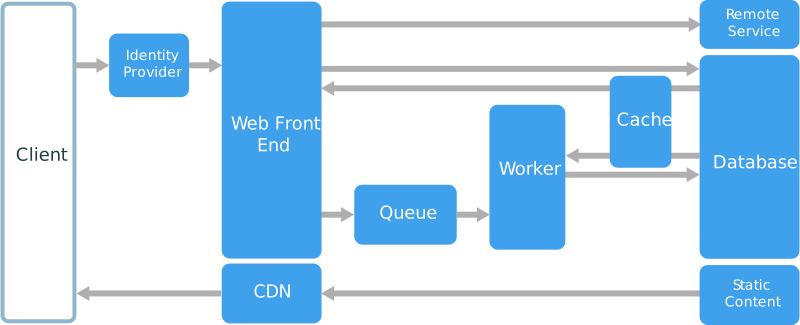 Other components that are commonly incorporated into this architecture include:
- One or more databases.
- A cache to store values from the database for quick reads.
- CDN to serve static content
- Remote services, such as email or SMS service. Often these features are provided by third parties.
- Identity provider for authentication.
When to use this architecture
The Web-Queue-Worker architecture is typically implemented using managed compute services, either Azure App Service or Azure Cloud Services. Consider this architecture style for:- Applications with a relatively simple domain.
- Applications with some long-running workflows or batch operations.
- When you want to use managed services, rather than infrastructure as a service (IaaS).
Benefits
- Relatively simple architecture that is easy to understand.
- Easy to deploy and manage.
- Clear separation of concerns.
- The front end is decoupled from the worker using asynchronous messaging.
- The front end and the worker can be scaled independently.
Challenges
- Without careful design, the front end and the worker can become large, monolithic components that are difficult to maintain and update.
- There may be hidden dependencies, if the front end and worker share data schemas or code modules.
Best practices
Web-Queue-Worker on Azure App Service
This section describes a recommended Web-Queue-Worker architecture that uses Azure App Service.Workflow
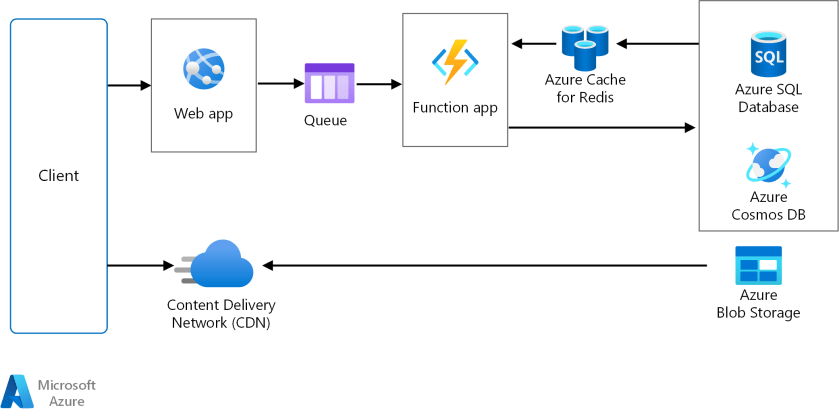
- The front end is implemented as an Azure App Service web app, and the worker is implemented as an Azure Functions app. The web app and the function app are both associated with an App Service plan that provides the VM instances.
- You can use either Azure Service Bus or Azure Storage queues for the message queue. (The diagram shows an Azure Storage queue.)
- Azure Cache for Redis stores session state and other data that needs low latency access.
- Azure CDN is used to cache static content such as images, CSS, or HTML.
- For storage, choose the storage technologies that best fit the needs of the application. You might use multiple storage technologies (polyglot persistence). To illustrate this idea, the diagram shows Azure SQL Database and Azure Cosmos DB.
Other considerations
- Not every transaction has to go through the queue and worker to storage. The web front end can perform simple read/write operations directly. Workers are designed for resource-intensive tasks or long-running workflows. In some cases, you might not need a worker at all.
- Use the built-in autoscale feature of App Service to scale out the number of VM instances. If the load on the application follows predictable patterns, use schedule-based autoscale. If the load is unpredictable, use metrics-based autoscaling rules.
- Consider putting the web app and the function app into separate App Service plans. That way, they can be scaled independently.
- Use separate App Service plans for production and testing. Otherwise, if you use the same plan for production and testing, it means your tests are running on your production VMs.
- Use deployment slots to manage deployments. This method lets you deploy an updated version to a staging slot, then swap over to the new version. It also lets you swap back to the previous version, if there was a problem with the update.
Enjoyed this article? Sign up for our newsletter to receive regular insights and stay connected.