
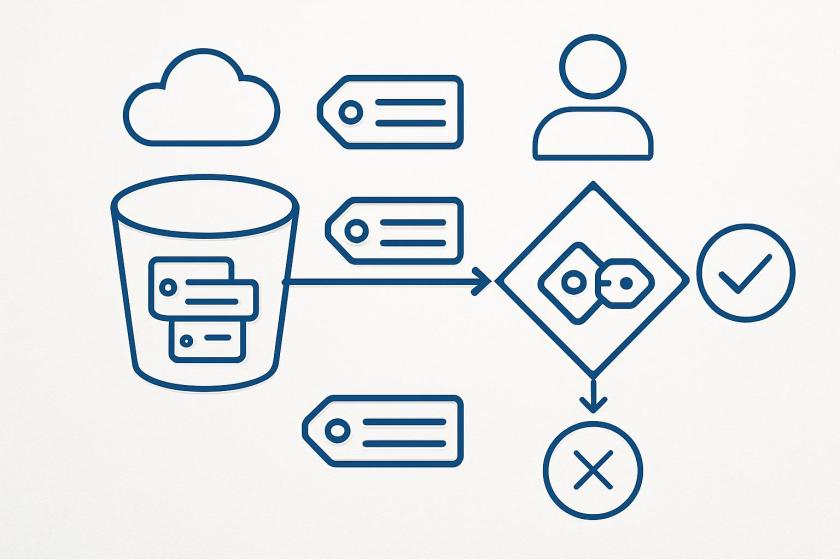
ABAC for S3 general purpose buckets shifts access control from bucket-by-bucket administration to a tag-driven governance model. For platform teams, the key architectural change is that authorization becomes dependent on tag consistency across IAM principals, bucket resources and policy conditions. That makes the design less brittle at scale, but it also raises the importance of disciplined tag taxonomy, lifecycle management and validation before rollout.
From an implementation standpoint, this is not just a policy edit. Buckets must be explicitly enabled for ABAC, and existing automation may need adjustment because tag operations and bucket creation workflows now interact with authorization behavior. If infrastructure code, provisioning pipelines or application tooling still relies on older tagging paths, teams will need to reconcile those flows with the tag controls that ABAC expects. That makes IaC templates, CI/CD guardrails and provisioning standards part of the security design, not just the delivery process.
Operationally, the biggest benefit is reduced policy sprawl. Instead of updating permissions every time a team changes or a new bucket is created, access can follow stable attributes such as environment, project or data classification. The trade-off is that governance quality now depends on tag hygiene. Poorly enforced tags can create access gaps or unintended exposure, so organizations should treat tag validation, drift detection and auditability as first-class controls.
There is also a useful enterprise architecture angle: the same metadata can support both authorization and cost allocation. That unification can improve accountability across finance, security and platform engineering, but only if the organization standardizes which tags are authoritative and how they are applied at creation time. In practice, ABAC is most effective when paired with SCPs, IAM conditions and monitoring that confirm tagging rules are actually being followed.
Here’s a common scenario: as an administrator, I want to give developers access to all S3 buckets meant to be used in development environments. With ABAC, I can tag my development environment S3 buckets with a key-value pair such as
environment:development and then attach an ABAC policy to an AWS Identity and Access Management (IAM) principal that checks for the same environment:development tag. If the bucket tag matches the condition in the policy, the principal is granted access.
Let’s see how this works.
Getting startedFirst, I need to explicitly enable ABAC on each S3 general purpose bucket where I want to use tag-based authorization. I navigate to the Amazon S3 console, select my general purpose bucket then navigate to Properties where I can find the option to enable ABAC for this bucket.
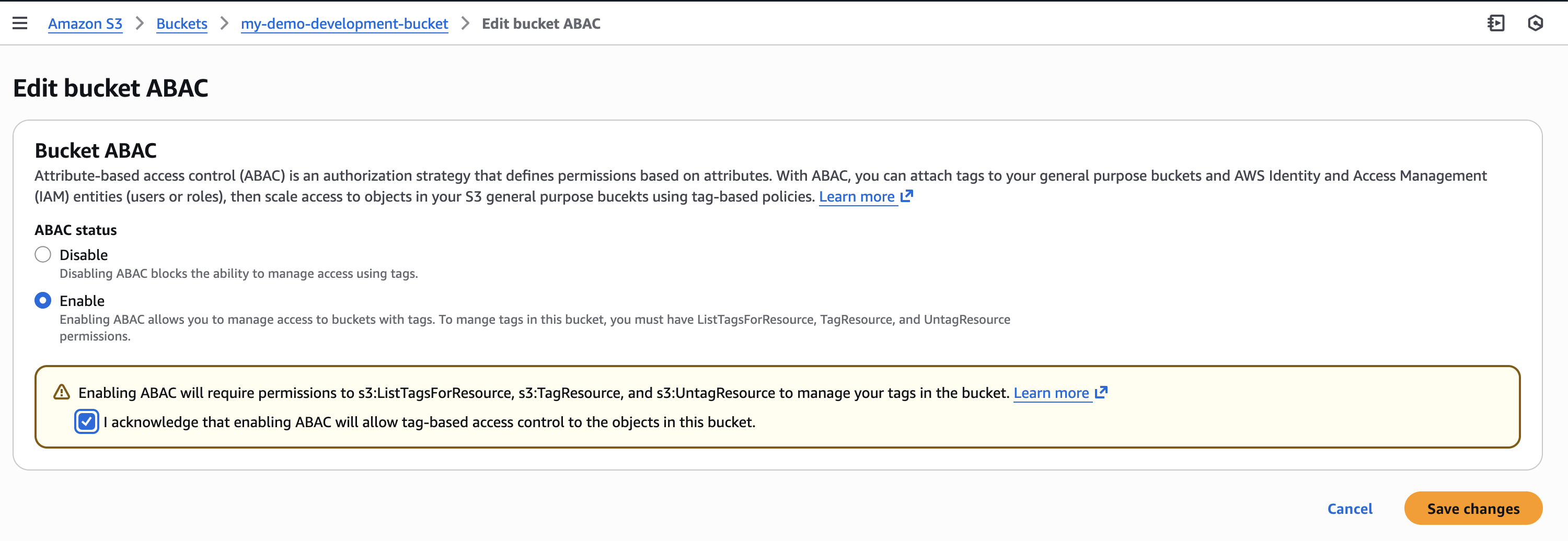 I can also use the AWS Command Line Interface (AWS CLI) to enable it programmatically by using the new PutBucketAbac API. Here I am enabling ABAC on a bucket called my-demo-development-bucket located in the US East (Ohio) us-east-2 AWS Region.
aws s3api put-bucket-abac --bucket my-demo-development-bucket abac-status Status=Enabled --region us-east-2AbacStatus property to Enabled in your template.
Next, let’s tag our S3 general purpose bucket. I add an environment:development tag which will become the criteria for my tag-based authorization.
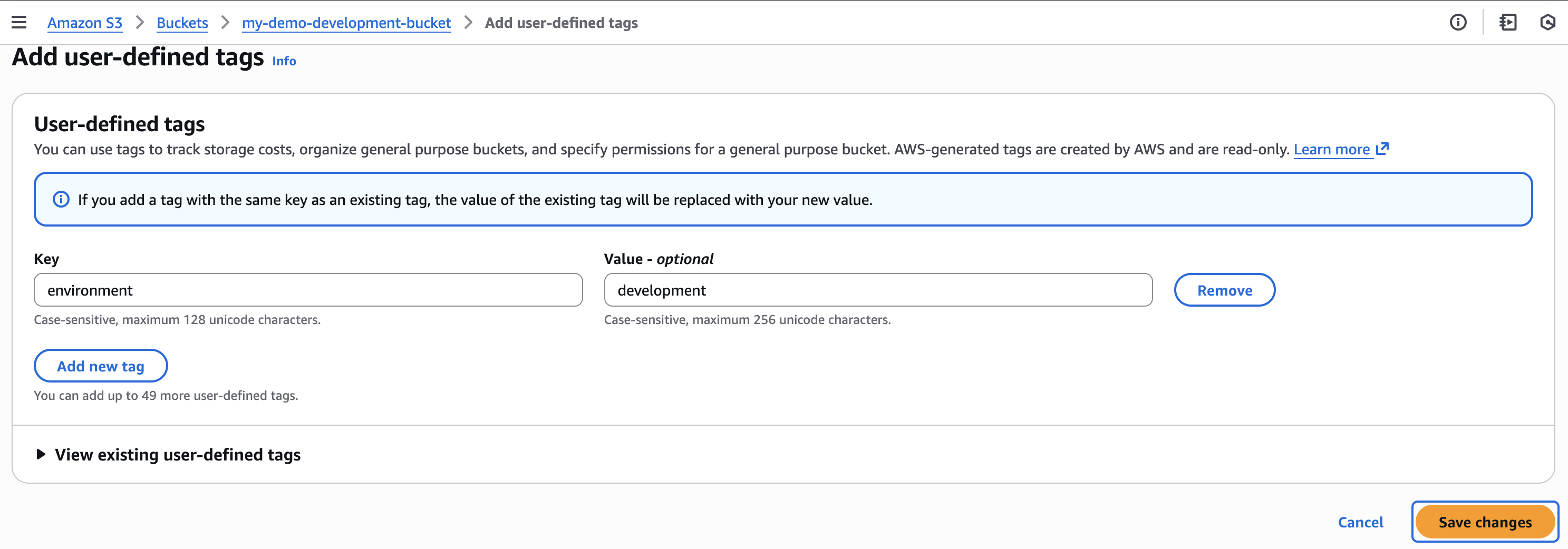 Now that my S3 bucket is tagged, I’ll create an ABAC policy that verifies matching
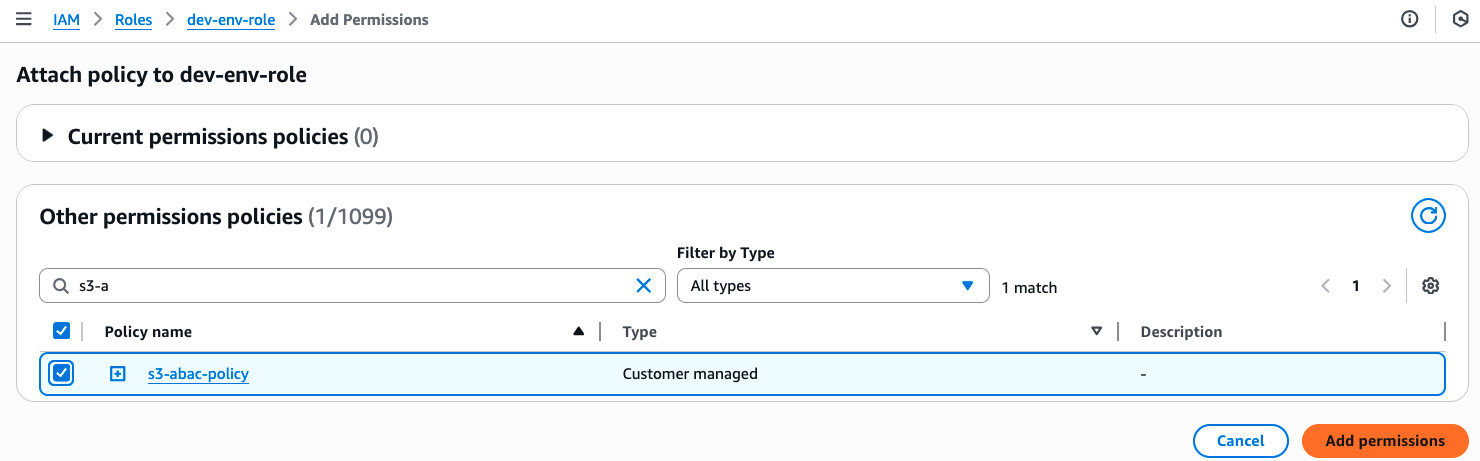
 environment:development tags and attach it to an IAM role called dev-env-role. By managing developer access to this role, I can control permissions to all development environment buckets in a single place.
I navigate to the IAM console, choose Policies, and then Create policy. In the Policy editor, I switch to JSON view and create a policy that allows users to read, write and list S3 objects, but only when they have a tag with a key of “environment” attached and its value matches the one declared on the S3 bucket. I give this policy the name of s3-abac-policy and save it.
{
    "Version": "2012-10-17",
    "Statement": [
        {
            "Effect": "Allow",
            "Action": [
                "s3:GetObject",
                "s3:PutObject",
                "s3:ListBucket"
            ],
            "Resource": [
                "*"
            ],
            "Condition": {
                "StringEquals": {
                    "aws:ResourceTag/environment": "development"
                }
            }
        }
    ]
} That’s it! Now a user assuming the dev-role can access any ABAC-enabled bucket with the tag environment:development such as my-demo-development-bucket.
Using your existing tags
That’s it! Now a user assuming the dev-role can access any ABAC-enabled bucket with the tag environment:development such as my-demo-development-bucket.
Using your existing tagsKeep in mind that although you can use your existing tags for ABAC, because these tags will now be used for access control, we recommend reviewing your current tag setup before enabling the feature. This includes reviewing your existing bucket tags and tag-based policies to prevent unintended access, and updating your tagging workflows to use the standard TagResource API (since enabling ABAC on your buckets will block the use of the PutBucketTagging API). You can use AWS Config to check which buckets have ABAC enabled and review your usage of PutBucketTagging API in your application using AWS Cloudtrail management events. Additionally, the same tags you use for ABAC can also serve as cost allocation tags for your S3 buckets. Activate them as cost allocation tags in the AWS Billing Console or through APIs, and your AWS Cost Explorer and Cost and Usage Reports will automatically organize spending data based on these tags. Enforcing tags on creation
To help standardize access control across your organization, you can now enforce tagging requirements when buckets are created through service control policies (SCPs) or IAM policies using the
aws:TagKeys and aws:RequestTag condition keys. Then you can enable ABAC on these buckets to provide consistent access control patterns across your organization. To tag a bucket during creation you can add the tags to your CloudFormation templates or provide them in the request body of your call to the existing S3 CreateBucket API. For example, I could enforce a policy for my developers to create buckets with the tag environment=development so all my buckets are tagged accurately for cost allocation. If I want to use the same tags for access control, I can then enable ABAC for these buckets.
Things to know
With ABAC for Amazon S3, you can now implement scalable, tag-based access control across your S3 buckets. This feature makes writing access control policies simpler, and reduces the need for policy updates as principals and resources come and go. This helps you reduce administrative overhead while maintaining strong security governance as you scale.
Attribute-based access control for Amazon S3 general purpose buckets is available now through the AWS Management Console, API, AWS SDKs, AWS CLI, and AWS CloudFormation at no additional cost. Standard API request rates apply according to Original Postricing?trk=ac97e39c-d115-4d4a-b3fe-c695e0c9a7ee&sc_channel=el" shape="rect">Amazon S3 pricing. There’s no additional charge for tag storage on S3 resources.
You can use AWS CloudTrail to audit access requests and understand which policies granted or denied access to your resources.
You can also use ABAC with other S3 resources such as S3 directory bucket, S3 access points and S3 tables buckets and tables. To learn more about ABAC on S3 buckets see the Amazon S3 User Guide.
You can use the same tags you use for access control for cost allocation as well. You can activate them as cost allocation tags through the AWS Billing Console or APIs. Check out the documentation for more details on how to use cost allocation tags.
Enjoyed this article? Sign up for our newsletter to receive regular insights and stay connected.