
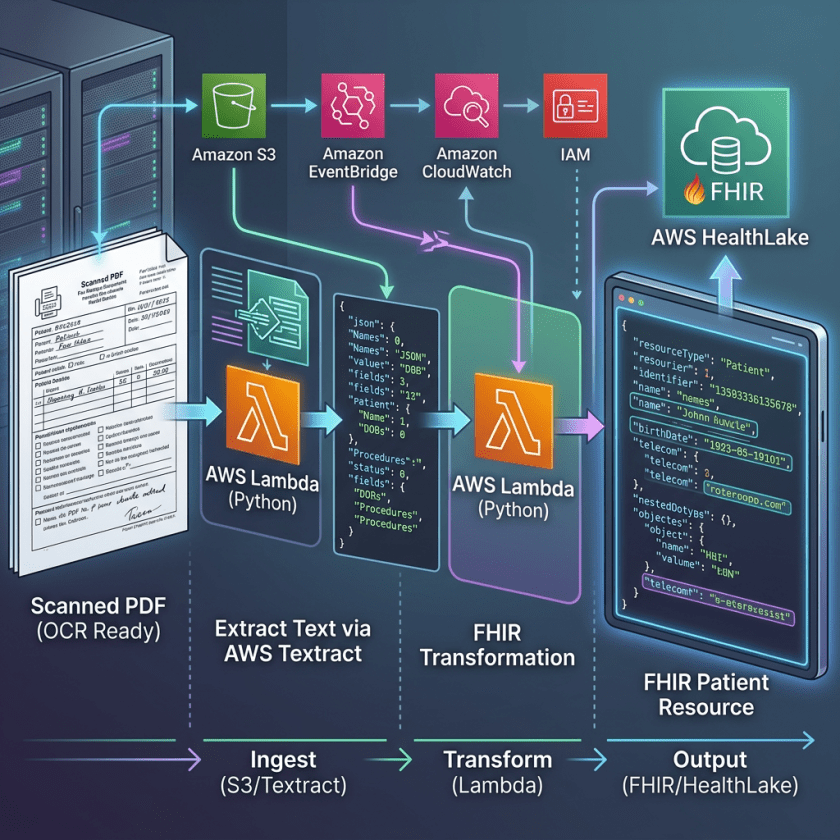
The real significance here is not document scanning but the creation of a controlled data path from paper archives into an interoperable clinical store. By combining event-driven storage notifications, narrow Lambda functions, and a FHIR R4 datastore, the design replaces brittle manual transcription with a repeatable pipeline. That matters to practitioners because it shifts digitization from a labor problem to an infrastructure problem, where validation, access patterns, and service boundaries can be reasoned about and audited rather than improvised.
The mechanism is technically tidy: a PDF lands in object storage, extraction returns more than 50 structured clinical fields with confidence scores, and a second function maps those results into FHIR resources before importing NDJSON into HealthLake. The separation between extraction and transformation is the important architectural choice. It keeps each component testable, lets storage events drive the workflow without polling, and makes the resulting records immediately searchable through standard patient, condition, medication, and lab queries.
The practical limit is that the sample is explicitly a demonstration for synthetic data, not a production PHI platform. The text is clear that real deployments need a business associate agreement, private networking, stronger logging, transit encryption, and broader compliance controls under the shared responsibility model. That distinction matters because the pipeline lowers integration effort, not regulatory burden. Its value is in showing how to standardize intake at scale; its risk is mistaking a working demo for a complete operational posture.
The challenge with paper medical records
Healthcare organizations face a compounding problem. Paper records don’t only create storage challenges, they create care gaps. When a patient arrives at a new facility, clinicians often proceed with incomplete information because retrieving and interpreting historical records takes too long. Manual digitization is expensive, error-prone, and doesn’t scale. The solution requires more than scanning documents. It requires extracting structured, clinically meaningful data and storing it in a format that integrates with existing systems. That’s where Fast Healthcare Interoperability Resources (FHIR) comes in. FHIR is the healthcare industry’s standard for exchanging electronic health information.Solution overview
This solution uses an event-driven, serverless architecture to automate the full journey from PDF upload to queryable FHIR data. No custom machine learning models or manual template configuration are required. AWS services used:- Amazon Bedrock Data Automation (BDA): Extracts over 50 structured clinical fields from scanned PDFs using advanced AI capabilities, including patient demographics, diagnoses with ICD-10 codes, medications, vital signs, and lab results.
- AWS Lambda: Two serverless functions orchestrate the pipeline: a BDA Trigger function that fires when a PDF is uploaded, and a FHIR Processor function that converts extracted JSON into FHIR R4 format.
- Amazon Simple Storage Service (Amazon S3): Input and output buckets with event notifications drive the pipeline automatically, with no polling or scheduled jobs required.
- AWS HealthLake: A FHIR R4-compliant, HIPAA-eligible data store that validates, indexes, and exposes data through standard FHIR API endpoints.
- AWS CloudFormation: Provisions the entire infrastructure as code in a single automated deployment (approximately 15–20 minutes).
- Amazon CloudWatch and AWS CloudTrail: Provide end-to-end monitoring, logging, and audit trails across all pipeline components.
- AWS Key Management Service (AWS KMS): Encrypts AWS HealthLake data at rest using customer managed keys.
Architecture
 Figure 1: End-to-end architecture showing the event-driven pipeline from PDF upload to FHIR-compliant data storage
The pipeline runs in three phases, each building on the last.
Figure 1: End-to-end architecture showing the event-driven pipeline from PDF upload to FHIR-compliant data storage
The pipeline runs in three phases, each building on the last.
Phase 1: Infrastructure deployment
AWS CloudFormation provisions all required resources in a single stack: Amazon S3 input and output buckets, two Lambda functions, AWS Identity and Access Management (IAM) roles with least-privilege permissions, AWS KMS keys, CloudWatch log groups, and an AWS HealthLake FHIR R4 datastore. The entire environment, including all service-to-service permissions, is version-controlled and repeatable.Phase 2: Event-driven data processing
The processing pipeline is fully event-driven. No scheduler or orchestration service is required. Each step triggers the next automatically:- PDF Upload → S3 Input Bucket
- S3 Event → Triggers BDA Lambda function
- BDA Processing → Extracts over 50 clinical fields with confidence scores
- JSON Storage → S3 Output Bucket
- S3 Event → Triggers FHIR Processor Lambda function
- FHIR Conversion → Creates FHIR R4 Bundle (JSON + NDJSON)
- HealthLake Import → Automatic NDJSON ingestion and validation
- FHIR API Access → Query using HealthLake endpoints
Phase 3: Query and analytics
After the data is in AWS HealthLake, it’s immediately queryable using standard FHIR R4 API endpoints. Python scripts authenticate using AWS Signature Version 4 (SigV4) and support searches by patient, condition, medication, or lab result type.How the services connect
Understanding the service interconnections is key to customizing or extending this solution.Amazon S3 as the pipeline backbone
Amazon S3 plays a dual role: it’s both the entry point for raw PDFs and the handoff layer between processing stages. Amazon S3 event notifications remove the need for polling. When a PDF lands in the input bucket, the BDA Lambda fires immediately. When BDA writes its JSON output to the output bucket, the FHIR Processor Lambda fires automatically. This decoupled design means that each stage can scale independently.Amazon Bedrock Data Automation as the intelligence layer
BDA serves as the intelligence layer. When Lambda triggers the extraction job, BDA retrieves the PDF from Amazon S3 and applies a custom medical blueprint, which is a schema defining the over 50 clinical fields to extract. The service understands document structure without requiring templates or training data. Each extracted field is returned with a confidence score (0.0–1.0), which the FHIR Processor Lambda uses to apply validation thresholds before conversion.AWS Lambda as the transformation layer
The two Lambda functions are intentionally narrow in scope:- The BDA Trigger Lambda receives the Amazon S3 event, constructs the BDA API call, and submits the processing job.
- The FHIR Processor Lambda reads BDA’s JSON output, maps each extracted field to the appropriate FHIR R4 resource type, assembles a FHIR Bundle, exports it as NDJSON, and triggers an AWS HealthLake import job.
AWS HealthLake as the FHIR data store
AWS HealthLake receives the NDJSON import, validates each resource against the FHIR R4 specification, creates relationships between resources (for example, linkingCondition resources to their Patient), indexes data for efficient querying, and generates unique FHIR resource IDs. The result is a fully queryable FHIR data store accessible through authenticated API calls.
IAM roles as the security fabric
Each service communicates with the next using IAM roles with least-privilege permissions. There are no hardcoded credentials and no overly broad policies. Lambda functions assume roles that grant only the specific actions they need (for example,bedrock-data-automation:InvokeDataAutomationAsync and s3:GetObject for the BDA Trigger Lambda).
Walkthrough
This walkthrough takes you from prerequisites through deployment and verification.Prerequisites
Before deploying, confirm you have the following: Required software:- Python 3.10 or later.
- Poetry (Python dependency management).
- AWS Command Line Interface (AWS CLI) configured with appropriate credentials.
poetry --versioncurl -sSL https://install.python-poetry.org | python3 -- Amazon Bedrock Data Automation.
- AWS CloudFormation (create, update, and delete stacks).
- Amazon S3 (create buckets, upload and download objects).
- AWS Lambda (create and update functions).
- AWS Identity and Access Management (IAM) (create roles and policies).
- AWS HealthLake (create data stores).
us-east-1 (US East N. Virginia) and us-west-2 (US West Oregon) only. These are the Regions where Amazon Bedrock Data Automation is available.
Deploy the pipeline
Deployment takes approximately 15–20 minutes. Run the following four commands to go from zero to a fully deployed pipeline:# 1. Clone the repository and install dependencies
git clone <repository-url>
cd Medical-Record-Digitization-and-FHIR-Integration-Pipeline
poetry install
# 2. Configure your environment
poetry run python src/utils/setup_env.py
# 3. Deploy the CloudFormation stack (approximately 15 minutes)
poetry run python src/automation/deploy.py
# 4. Verify deployment
aws cloudformation describe-stacks \
--stack-name bda-medical-records-stack \
--query 'Stacks[0].StackStatus'
# Expected output: "CREATE_COMPLETE"- Amazon Bedrock Data Automation blueprint and project (custom medical records schema with over 50 fields).
- Amazon S3 input and output buckets with automatic event notifications.
- Two AWS Lambda functions (BDA Trigger and FHIR Processor).
- AWS HealthLake FHIR R4 data store.
- AWS Identity and Access Management (IAM) roles and policies with least-privilege permissions.
- Amazon CloudWatch log groups for all Lambda executions.
For manual environment configuration, advanced deployment options, and troubleshooting, see the GitHub repository.
See it in action
After it’s deployed, upload a sample medical record to trigger the full pipeline. You can use the sample provided in the GitHub repository.# Get your input bucket name from the CloudFormation stack output
INPUT_BUCKET=$(aws cloudformation describe-stacks \
--stack-name bda-medical-records-stack \
--query 'Stacks[0].Outputs[?OutputKey==`InputBucketName`].OutputValue' \
--output text)
# Upload a sample PDF (use the synthetic records included in the repository)
aws s3 cp samples/medical-record-sample.pdf s3://$INPUT_BUCKET/
# Track BDA processing jobs
poetry run python src/utils/track_bda_jobs.pypoetry run python src/utils/view_results.pyFound 8 result files in output bucket
Processing: medical-record-sample_results.json
Patient Information:
---------------------
Name: Wilkins, Samantha
Patient ID: A1B2C3D4
Date of Birth: 10/28/1953
Conditions (5 found):
- Hypothyroidism (ICD-10: E03.9) - Confidence: 0.98
- Vitamin D Deficiency (ICD-10: E55.9) - Confidence: 0.95
- Hypertension (ICD-10: I10) - Confidence: 0.97
- Osteoarthritis (ICD-10: M19.90) - Confidence: 0.92
- Gastroesophageal Reflux Disease (ICD-10: K21.9) - Confidence: 0.96
Medications (4 found):
- Levothyroxine 100 mcg daily
- Vitamin D3 2000 IU daily
- Lisinopril 10 mg daily
- Omeprazole 20 mg daily
Lab Results (16 tests):
TSH: 2.3 mIU/L (Normal range: 0.4-4.0) ✓
Vitamin D: 28 ng/mL (Normal range: 30-100) ⚠
Blood Pressure: 128/82 mmHg (Stage 1 Hypertension) ⚠
[✅] FHIR conversion complete
[✅] Imported to HealthLake datastore: ds-abc123xyz456Query FHIR data from AWS HealthLake
After ingestion, query your data using the interactive FHIR query interface:poetry run python src/utils/query_medical_data.py# Search by patient name
Patient?name=Wilkins
# Get conditions for a specific patient
Condition?patient=Patient/47ef817a-9826-4498-b693-2af5eb2b5250
# Get lab results only
Observation?category=laboratory
# Get vital signs only
Observation?category=vital-signs
# Get all medications
MedicationRequestimport boto3, requests, os
from botocore.auth import SigV4Auth
from botocore.awsrequest import AWSRequest
session = boto3.Session()
credentials = session.get_credentials()
region = os.environ.get('AWS_REGION', 'us-west-2')
datastore_id = os.environ.get('DATASTORE_ID')
url = f'https://healthlake.{region}.amazonaws.com/datastore/{datastore_id}/r4/Patient?name=Wilkins'
request = AWSRequest(method='GET', url=url, headers={'Accept': 'application/fhir+json'})
SigV4Auth(credentials, 'healthlake', region).add_auth(request)
response = requests.get(url, headers=dict(request.headers))
print(response.json())Security considerations
This is a demonstration sample for synthetic data only. Do not use with real Protected Health Information (PHI) without implementing the controls listed in the following sections. Security controls included in this sample:- IAM roles with least-privilege permissions.
- Amazon S3 bucket access controls (private by default).
- AWS KMS encryption for AWS HealthLake data at rest.
- AWS service-to-service authorization using IAM roles.
- Amazon CloudWatch logging for audit trails.
- AWS Business Associate Addendum (BAA): Required under HIPAA before processing PHI on AWS.
- Amazon Virtual Private Cloud (Amazon VPC) isolation: Lambda functions and AWS HealthLake in private subnets with AWS PrivateLink.
- Comprehensive logging: AWS CloudTrail, AWS Config, Amazon S3 access logs, and Amazon VPC flow logs.
- Encryption in transit: TLS 1.2 or later. Use Amazon VPC endpoints to avoid public internet exposure.
- Access controls: Multi-factor authentication (MFA), role-based access control (RBAC), temporary credentials, and regular access reviews.
- Compliance monitoring: AWS Security Hub with HIPAA compliance checks.
- Data lifecycle management: Retention policies, secure deletion, and data loss prevention (DLP) controls.
Pricing
The following estimates apply to testing with approximately 100 medical records per month in the US West (Oregon) Region:| Service | Usage | Estimated monthly cost |
| Amazon Bedrock Data Automation | 100 pages (approximately $0.20–$0.30/page) | $20–$30 |
| AWS HealthLake | 5 GB storage + 100 queries | $15–$20 |
| AWS Lambda | 200 invocations (512 MB, approximately 30s avg) | $5–$10 |
| Amazon S3 | 1 GB storage + 200 requests | $1–$2 |
| AWS KMS | 1 customer managed key | $1 |
| Total approximately $50–$100/month |
- Delete the CloudFormation stack when not actively testing:
aws cloudformation delete-stack --stack-name bda-medical-records-stack. - Set up AWS Budgets alerts to catch unexpected costs early.
- Monitor Lambda duration in CloudWatch to optimize function execution time.
Clean up
To avoid ongoing charges, delete the CloudFormation stack when you’re done:aws cloudformation delete-stack --stack-name bda-medical-records-stack
aws cloudformation wait stack-delete-complete --stack-name bda-medical-records-stackWhat’s next
After you deploy, you can extend this foundation to:- Integrate with existing electronic health records (EHR) systems through FHIR APIs.
- Build analytics dashboards using Amazon Quick Sight.
- Add natural language search with Amazon Kendra.
- Add Amazon Simple Queue Service (Amazon SQS) as a buffer between Amazon S3 events and the BDA Trigger Lambda to handle burst uploads and manage BDA concurrency limits at scale.
- Orchestrate with AWS Step Functions for error handling, retry logic, and routing low-confidence extractions to human review.
- Implement real-time, high-volume processing with Amazon Kinesis Data Streams for continuous ingestion from multiple sources.
Conclusion
In this post, you saw how Amazon Bedrock Data Automation, AWS Lambda, Amazon S3, and AWS HealthLake work together to automate the transformation of scanned medical records into FHIR R4-compliant data. The event-driven architecture removes manual data entry, scales without custom machine learning models, and makes historical records accessible to modern care delivery systems. Key takeaways:- Amazon Bedrock Data Automation extracts over 50 structured clinical fields from PDFs without template configuration.
- AWS Lambda orchestrates the pipeline with two focused, event-driven functions.
- Amazon S3 event notifications decouple each stage, so each can scale independently.
- AWS HealthLake validates, indexes, and exposes FHIR R4 data through standard APIs.
- Security controls are the customer’s responsibility under the AWS Shared Responsibility Model.
Additional resources
For more information, see the following additional resources:- Amazon Bedrock Data Automation documentation
- AWS HealthLake documentation
- FHIR R4 specification
- AWS HIPAA Compliance
- AWS Architecture Center: Healthcare solutions
About the authors
Enjoyed this article? Sign up for our newsletter to receive regular insights and stay connected.